Afternoon all,
I desperately need some help and Google isn't being to nice to me at the moment.
I have an Alteryx app that takes the XML from a current workflow/app/macro, adds a new tool (text input, for documentation purposes), saves the workflow as a new workflow with a new name and moves the original workflow into an archive folder location.
The app works perfectly(!) however, when a formula (in the workflow that is to be amended/copied etc), contains a special character (in this case a '£' sign) the new workflow that is created throws an error when it is opened.
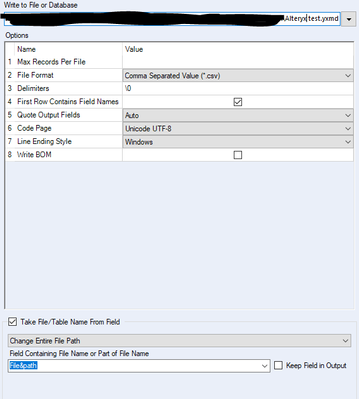
Long story short and to the root of the problem, the new workflow that gets created, is encoded in 'ANSI'. Whereas it should be Unicode UTF-8. I have changed the output tool>code page to Unicode UTF-8, but when I open the new workflow in Notepad++ it is still encoded in ANSI
(I even changed the default code in User Settings>Localization to Unicode UTF-8, but still nothing works.
Does anyone have any idea how to force the output (Which is a csv, saved as .yx**(depending on either workflow/macro/app) by the way)
Also, tried using "ConvertToCodePage([<?xml version="1.0"?>],65001)" in a formula tool before the output tool, but that didn't do anything.