Hi All,
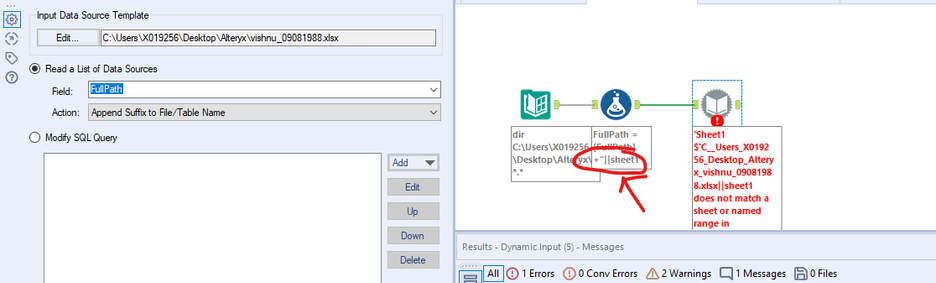
While i am using Dynamic input tool i am getting the below. can any suggest
Hi @Vishnusai
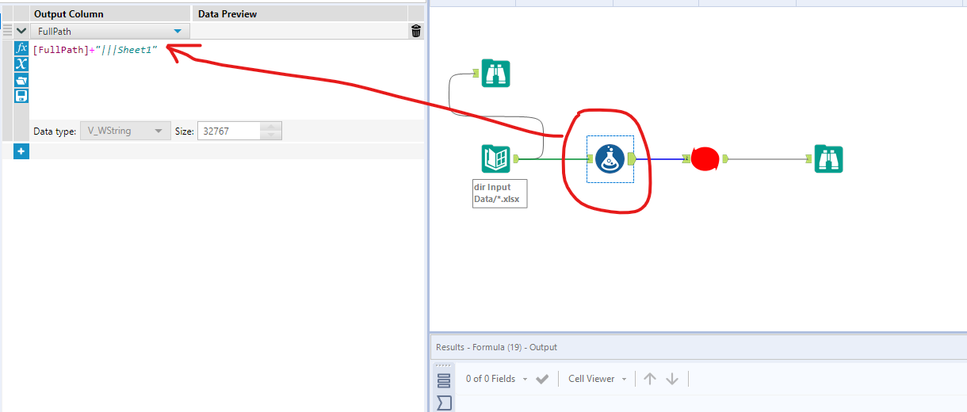
Make sure the below option is set to change entire path like below
And please use 3 pipes ||| or else it wont work
Hope this helps : )
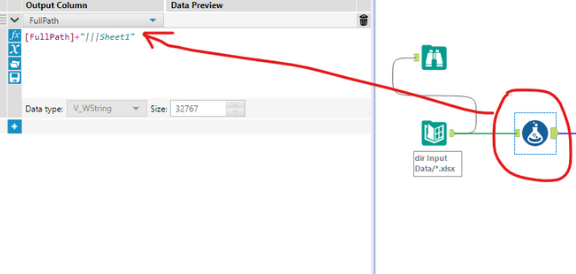
You need to tell it what sheet of the xlsx file to load. If all the files in your directory have the same sheet name, you can append the filepath with '|||TabName' will work. If they're all different, check out this post to use a macro to read in the tab names.
https://community.alteryx.com/t5/Alteryx-Designer-Discussions/Get-worksheet-names-from-excel/td-p/344867
You would need to the sheetname like using a formula tool like below. Here my sheetname is Sheet1.
Hi @Vishnusai You need to use pipes instead of underscores.
@Vishnusai seems to be you are using back slash (\\\)instead of pipe (|||) before the sheet name. please follow as @atcodedog05 suggested
@MichelleL iam using the older version of alteryx, I am unable to export the marco in my machine. can you send the screenshot of the Configuration
@atcodedog05
Thanks for the Help:)
@Vishnusai Attached are the macros saved down to 2020.1 as well as the workflow saved down to 2020.1. Unfortunately when I export the workflow, it resaves to 2021.3. You can use the attached workflow and macros to replace the ones in the export/zip file. Just find the files in the folder that unzips when you open the zip file and replace them with the attached.
The configuration window was pasted in my previous post. I think you need to view the actual workflow to ensure your formula has pipes and your configurations are all set correctly.
Let me know if you have additional questions, happy Friday!