The workflow is set to output to two different tabs in the same spreadsheet, both sets of data have a date and time stamp column in them so it is easy to determine when the file was updated last. When I run the workflow the messages show that both outputs were written with no errors as you can see.
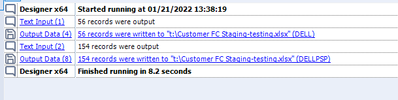
But when I go into the actual file I see that the 2nd output did not update it still has the old data. I have deleted and rebuilt the output tools with no change in the output results.
- These are overwriting a file that already exists, however if I delete the file that these outputs are writing to than both outputs write correctly, but the next time that I run the workflow to overwrite the existing data it only updates the 1st output.
- If I turn off the 1st output than the 2nd output writes just fine.
- I have used block until done , paralel block until done, and no block and all options run without errors but only update the single tab.
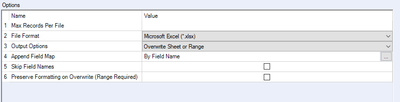
Output tool setings.
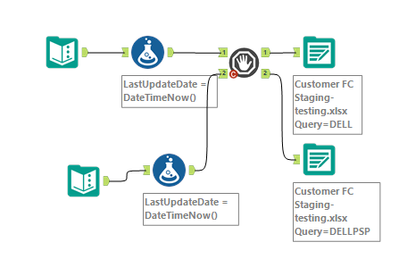
The original worklfow is hundreds of tools but for trouble shooting I stripped it down to this basic workflow design.
If it matters the output file is on a shared server.


