I am looking to import multiple .xml files from the same folder.
The schemer is slightly different on each as in the name of the file follows a date.
MyReport-12-01-21.xml
MyReport-13-01-21.xml
MyReport-14-01-21.xml
and so on.
Thanks
Hi @tf05
Here is how you can do it. Assuming you have all the files in the same folder.
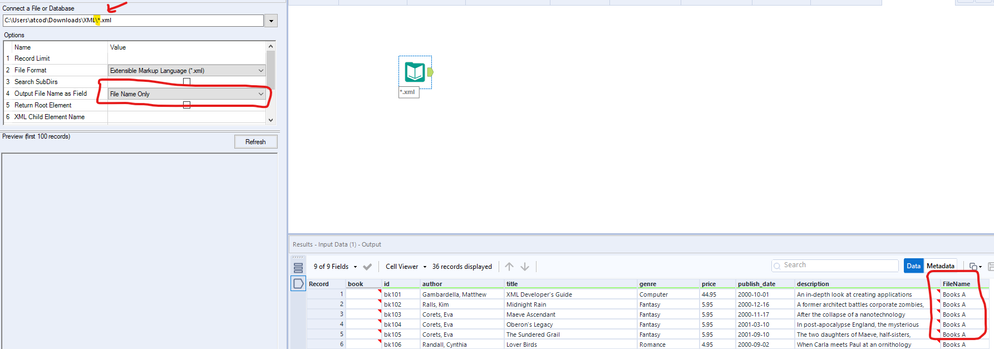
1. Replace filename to *.xml or MyReport*.xml
* means is any character wildcard. This way it will read all the XML files which meet the pattern. Refer highlighted
2. Set the option in the input tool to output filename this will add a column help you keep track of data. Refer highlighted
Workflow:
Hope this helps : )
Great, thank you. That has read the file although none of the data is pulling through?
@atcodedog05 is it because of the slight difference in the files schema? may a bath macro will do the trick?
Hi @binu_acs
If the schema is different it will not be read all. Here it's being read but no data. This might be an XML structuring issue in the input file.
a single file returns no data as well, does this suggest an issue with the XML structuring. Are there any workarounds?
@atcodedog05 thanks 🙂
The issue is with xml input file. Can you provide a sample file so that we can look into it.
Attached - hopefully I have had to redact it due to data protection, and shorted it as the body was huge, but hopefully the general structure remains
Try something like this.
Configure input tool like below
And use the attached workflow
Use this workflow just change the input folder path.
Hi @tf05, unfortunately this sample file does not work, I was not able to read it properly as it does not contain all the necessary information of a regular XML file.