Hi Everyone-
How to import "PyPDF4" package in the Python tool and would it differ from version to version.
any help would be appreciated.
Thanks,
Mukesh
Hey @Mukeshy12390 ,
Here is a link showing how to import different versions of a package. It would be basically like this:
https://community.alteryx.com/t5/Alteryx-Designer-Knowledge-Base/Have-different-Python-Module-versions-for-different-workflows/ta-p/719614
Here is a tutorial showing how to install packages from different versions.
https://community.alteryx.com/t5/Alteryx-Designer-Knowledge-Base/How-To-Use-Alteryx-installPackages-in-Python-tool/ta-p/406244
Best,
Fernando Vizcaino
Hi @Mukeshy12390
1. Open Alteryx as an administrator
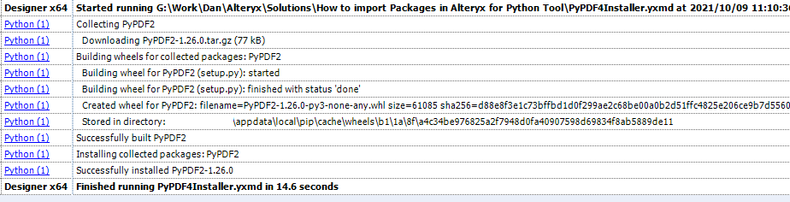
2. Run the PyPDF4Installer workflow(attached) you should see something like this in your results window
3. Close Alteryx
4. Open Alteryx with your workflow
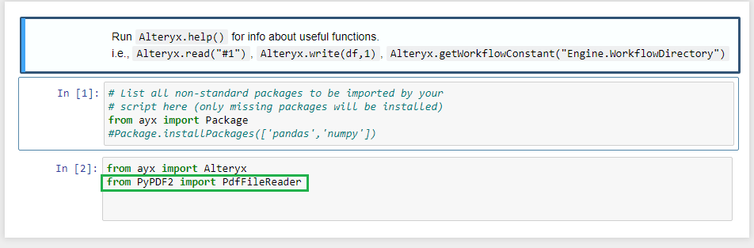
5. In your Python tool add the following line from PyPDF2 import PdfFileReader
From here you'll need to look at example pages for the package to find it's functions. This one is a good start.
Dan
thanks, Fernando for the quick reply.
I have been googling for a week and have already gone through those posts but couldn't understand.
I just need the exact code to import PDF package. here are the system details.
Workspace - VDI
Alteryx 2020.2.3
I'm just using two tools 1) Input tool and 2) Python tool.
Thank You! Fernando and Dan. it got resolved.
-------------------------------------------------------------------------------------------------
from ayx import AlteryxAlteryx.installPackages(package="PyPDF4",install_type="install -i FullPath")
----------------------------------------------------------------------------------------------------