The fuzzy match tool is pretty daunting, I've looked at a couple workflows from forum posts, I've looked at the built in examples in Designer, and I can't quite get this to work the way I want.
I want to conform values in 1 column, so I want Purge mode I believe. The values will be user IDs which may have a 1 character typo etc, so I'm using the custom match style, and generating keys for Whole Field, and the match function is Character (No Spaces): Best of Jaro & Levenshtein Distance. I don't totally understand what I'm doing with all that, but it sounds reasonable.
What's the difference between the match threshold in the regular tool configuration, and another match threshold in the Edit Match Options (where the Match Weight is also found)? I'm also confused that I select "Output Unmatched Records" and get fewer records than I started with? Also, I don't understand the addition of the RecordID tool (though I did it anyway) - the built in examples in Designer start with using the target field as both the match and recordID fields.
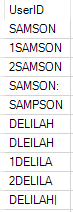
Here are some sample values, including special characters (one has a pipe, one has a colon). I'd like them to merge into just 2 distinct values. I tried tinkering with it a lot and couldn't get there