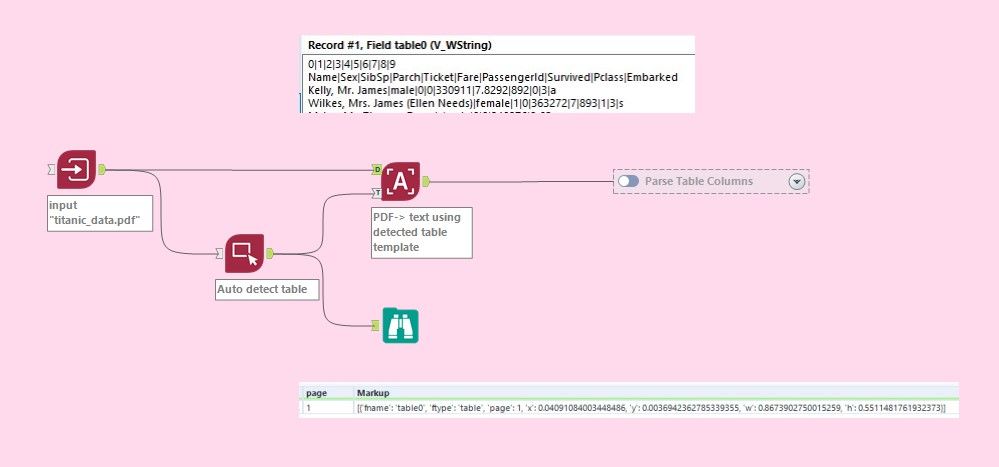
Auto detecting a table of data from a PDF using the new Computer Vision tools from Intelligence Suite is a great new functionality, but figuring out how to make it work was not intuitive for me. I did a lot of trial and error figuring out how to extract a table of data from a pdf. Here's how I made it work.
- Image Input - browse to "Titanic Data.PDF" (attached)
- Connect the output from the Image Input tool to both
- D input anchor of Image to Text tool
- the optional input anchor of an Image Template tool - set configuration image to 'image'
- Image Template Tool - set configuration Image to 'image'
the output contains a Markup field - connect the output to the T anchor of the Image to Text tool

- Image to Text tool - set configuration Image to 'image'
the output contains one pipe-delimited field called table0 (there may be additional table fields depending on the structure of the input pdf.)

- Use a Text to Columns tool with | delimiter
- Use a Sample tool to skip the first row of 0|1|2|3...
- Use Dynamic Rename to 'Take Field Names from First Row of Data'
My workflow (version 2021.3) and the PDF of titanic data are attached. I hope you find this helpful!
terry10