Hi folks,
I have a (I assume simple) problem that I couldn't find the answer for yet.
I have a folder filled with 28 excelfiles. Their templates are identical (some have a few "empty" columns I couldn't find yet that prevent them from loading in with a single wildcard input tool) and each contains several hundred thousand rows of data. I managed to input and join them using a batch macro but the precess is painfully slow (more then 1:20 hour just to load the data, no calculations yet).
I have observed that Alteryx is way faster with .csv files. I just loaded in 17 million rows of data in .csv files and it took uner 3 minutes. I tried saving the .xlsx as .csv in Excel, but if I do that I get an "too many input fields" error when inputting the .csv in Alteryx.
I found a quick workaround: Input the .xlsx file and directly output it as .csv (see attached picture).
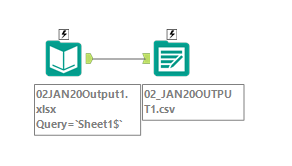
Of course I could to this one by one 28 times, but I feel like there must be a way to do this automatically since it takes a few minutes for each run. I know how to load all 28 files at once via a batch macro and save as a single .csv, but for documentary reasons I would like to keep them in their original format and get 28 .csv as well.
Is it possible to load in all 28 Excelfiles and output them as 28 .csv? It would be ideal if the filename of the .csv would match that of the input Excel (like seen in the example).
Thank you so much in advance!


