Hello, my Alteryx friends,
RE: Conditional filtering based on one column value grouping and utilizing 2 columns as the condition.
I must be staring at this for too long, but I’m reaching out for some hints/suggestions on a problem I’ve run into that I can’t seem to get past. I am thankful for all the community help getting to this point. Some of the posts and their solutions ended up as “Oh, I didn’t look at it that way” or “Even, oh that was easy, why didn’t I do that.” I’ve learned so much and am very appreciative.
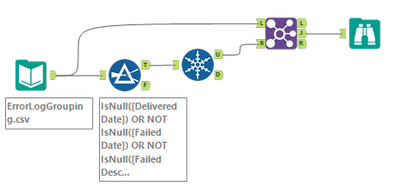
Ok, the issue is: I have an application that sends emails monthly for billing. The application has an ‘Account’ with an associated ‘email’ used to send emails to the customer. When an ‘Account’ has a unique ‘email’ (just one), that is easy to separate the two (thank you Alteryx Tool ‘Only Unique’) ‘successful delivered emails’ and ‘failed due to a bad email address.’
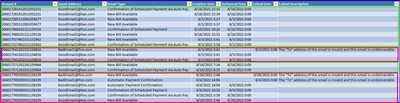
But when an ‘Account’ has multiple email accounts (Email A and Email  associated with the account. I want to collect the Accounts that have a failed email. So if you look at the pre-filter image. The boxes in Green represent the successful grouping of one ‘account’ email deliveries, and I don’t want to collect those entries. However, the ones in the Red boxes are the ones I want to know about. Of course, if this log contained a few 100 entries to filter through, I might consider doing this by hand, but the log is over 40k. So as you guessed it, automation is in order.
The post-filter image is what I’m trying to get. To represent an ‘Account’ with a failed email in it, I also want to know the successful ones within the account. So basically, the entire ‘Account,’ not just the failed ‘email.’
To me, the condition is if it has failed either by nothing in the ‘Delivered Date’ or there is a timestamp in the ‘Failed Date’ or the ‘Failed Description’ has content.
Any ideas? Am I making this too complicated, and it’s staring me right in the face? I appreciate the time that someone takes to look at it.
Jason Rendon
Example pre-filter:
Example post-filter: