Hello,
Wondering if anyone could help me? I've been challenged to create a new workflow from scratch and my skills in alteryx aren't the best, as I am fairly new to Alteryx Designer, yet I have had a play around and I have made the workflow.
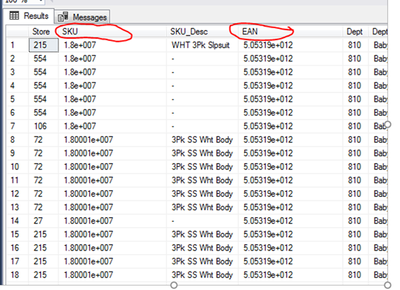
However, the problem I am having is that once the data is joined by SKU column and inputted into a SQL server, the SKU column and the EAN (barcode) column seem to be coming out as Scientific/Algebra figures eg. '1.8e+007’- as seen below. I thought this wouldn't be the end of the world as I could convert it in excel to a number afterwards, but it seems to be spitting out the complete wrong SKU replacing the last algeberic numbers with 0's and not the specific 11 digit number I am expecting. I checked the numbers in the original excel files the data comes from and they don't appear to be in this format within excel, so unsure why would appear like this when inputted into SQL from alteryx.
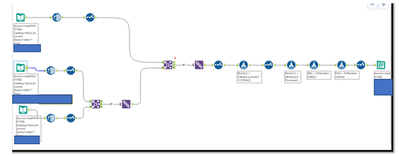
I have tried multiple methods to get around this like getting alteryx to cleanse the data, making sure these particular columns are not string fields but double fields, using formula tools to convert the probelmatic columns to number before it goes into the tables (as seen below). However, nothing I've tried so far appears to be making any difference, I wondered if anyone knew where I might be going wrong. I do run two workflows before this to get the data into the input tables for the final output workflow. So I'm not sure how far the issue goes back, but I thought I would be able to convert into a number regardless at any point in a workflow. Because of how large the data set is, I cant rely on making any changes in Excel afterwards as it is too big too download, therefore it is essential it goes into SQL as the correct number from alteryx. I seem to have got the data I need, but can't do anything with it, due to what I think is such a small issue with formatting.
Thanks,
Will


