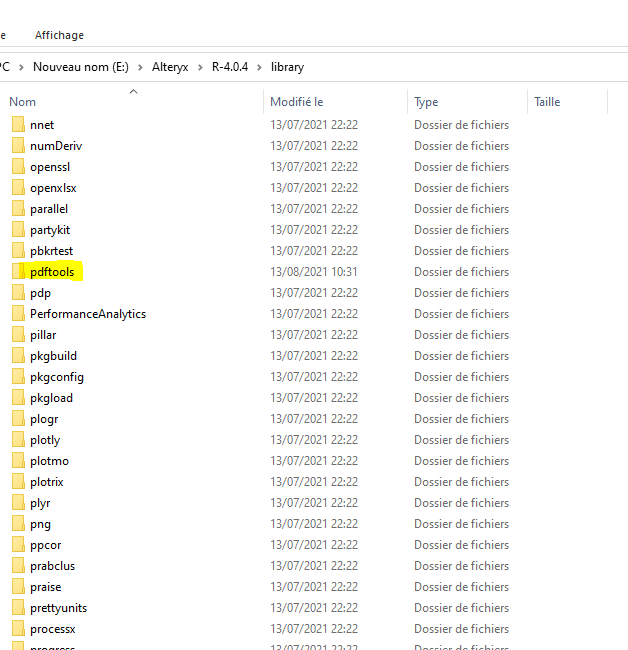
Hi everyone,
I tried the PDF Input tool found in the gallery and I stumbled upon this error : "PDF Input (14): BatchPDFInput (26): Record #1: Tool #2: Error: .onLoad failed in loadNamespace() for 'pdftools' ".
So I followed a link for solving the issue and installing the missing R package from the gallery.
However, the error still persists and I was just wondering why it didn't work.
Please, if you could help me resolve the issue.
Link: https://www.youtube.com/watch?v=0aM9YqC1Uuo&t=123s&ab_channel=NathanPatrickTaylor
PDF Input: https://gallery.alteryx.com/#!app/PDF-Input/5b685aff0462d710907f7a3b
Installing R packages: https://gallery.alteryx.com/#!app/Install-R-Packages/5d9264328a933711e447387c
Snapshot:
Hi @AT_AYX I had this exact problem the other day. The issue I had was that the version of 'Rcpp' that alteryx installs with R 4.0.4 is an older version.
You can either delete the folder of Rcpp in the library and then reinstall a new one, or you can apparently run the following command in the R.exe that Alteryx installs.
update.packages()
(taken from the following SO post: https://stackoverflow.com/questions/68416435/rcpp-package-doesnt-include-rcpp-precious-remove)
Hope that helps,
Ollie
edit: - I also reinstalled 'pdftools' when I was trying to fix this, but I'm not sure if that's a necessary step or not
Hi @AT_AYX sorry for the delayed response!
Do you have the Admin version of Alteryx? I just ran the update.packages() command on my machine and didn't get your error, so these steps seemed to work:
Firstly navigate to this R.exe: - "C:\Program Files\Alteryx\R-4.0.4\bin\R.exe"
Then right click it and 'run as administrator',
Then type in 'update.packages()' and hit 'y/n' for the packages until you reach Rcpp (where you should hit 'y').
Then let it do its thing.
If you've got the local version, then I think you'll need to navigate to the 'R.exe' in "C:\Users\[User]\AppData\Roaming\Alteryx" (I can't remember exactly where in there it is I'm afraid).
If you didn't want to do the update.packages(), then deleting the 'Rcpp' folder in either"C:\Program Files\Alteryx\R-4.0.4\library" (admin) or"C:\Users\[User]\AppData\Roaming\Alteryx\R-library" (non-admin)
and then install it to that location again either using the R.exe mentioned above, or the Install R packages app available here: [link]
Hope that helps!
To keep the topic current, I recently updated to Alteryx Designer 2021.4 and R-4.0.5. This broke my PDF input workflow.
To fix, run the R terminal - admin ("C:\Program Files\Alteryx\R-4.0.4\library") or non-admin ("C:\Users\[User]\AppData\Roaming\Alteryx\R-library")
I'm worried that the difference in R versions might be causing a problem. That macro was built for R-3.4.4 and it looks like you're using R-4.0.4 which comes with Designer 2021.2. I'm not sure what version of 'pdftools' you obtained since it depends on the method and source. Might be worth double checking.
Are there any messages in the results window from the R tool that might indicate a version compatibility issue?
Hello @CharlieS ,
Thank you for taking the time to view my problem.
Unfortunately, there is no compatibility issue that was shown. However, what was most interesting is that when I tried to replicate the R code in an R tool, it generates the same error and when trying to reinstall the package using the Analytic app (Install R package), the transcrib.yxzb shows an empty output (meaning that it's already installed I think)
Hi @OllieClarke ,
When I tried your solution (in both ways), I got the following errors:
Thanks, Ollie. This worked for me on R-4.0.5 as well. I was getting the same error with the PDF Input tool referencing 'Rcpp", and updating packages fixed it.
Matt
Use this! https://oliverpower.wordpress.com/2018/02/08/parsing-pdfs-using-alteryx-and-a-little-r/
I am running into the same problem.
I did not see a file called rcpp. @someotherguy @OllieClarke Thank you!
Hi @Gualigee
RCPP is another R package which needs to be updated if you've upgraded Alteryx. As has been mentioned in this thread by myself and @AnthonyFic the upgrade in R versions requires an update in a number of packages.
The easiest way to do this is to find the version of R installed with your version of Alteryx ("C:\Users\[username]\AppData\Local\Alteryx\R-[r version]\bin\R.exe" on a non-admin install). Double click R.exe to run it and then use the command
This will then ask you whether you want to update all the packages installed. I said yes to all of them, but the 4 required are (from @AnthonyFic's post)
pdftools
qpdf
tesseract
Rcpp
This should fix your problem
edit:
The reason you don't see Rcpp in your R-library, is that (I believe), for packages installed by default rather than installed by users, the filepath is: "C:\Users\[username]\AppData\Local\Alteryx\R-[r version]\library"
Hi all... this macro has been a godsend for years. I came here to ask a question which I'm now editing. After some trial and error, I found that @AnthonyFic 's comment with the Admin and Non-Admin paths helped us figure out where to place the tools. In the past, I've had them read in from different places - including my documents which has worked - but not this time. Once I installed them to the Non-Admin location that worked like a charm. I'm using 2023.1.
Updating this because I just posted on another thread that for some reason I can't find (not showing in my profile). I have one colleague who has her tools in the non-admin location and they are working fine. I tried that and couldn't get it to work, but finally put them in the admin location where Rcpp is, and now it's working. It's weird because we all have Admin versions of Designer, but sometimes it's just like that. Hope that helps someone.
Thank you for the tool, unfortunately, I was not able to make use of it.
This literally fixed an issue I just had with the PDF Input Tool. Thank you!