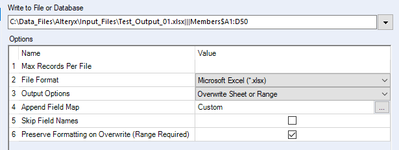
Hello ..I have a spreadsheet with multiple tabs, and I need to format the columns and copy the data into another spreadsheet. I created an empty test output spreadsheet with all the formatting. I have the below settings in the flow to overwrite the sheet, preserve formatting and it all works just fine, the formats are kept as I expected and data has been added correctly.
Since this a monthly process, I need to keep the input and output file names as dynamic file names. For this purpose, I created a template spreadsheet with the expected format and used file path replacement option with the file name dynamically generated. The spreadsheet is creating with the name and data that I need, but none of the formatting options are in the output file, though I checked the preserve formatting option..
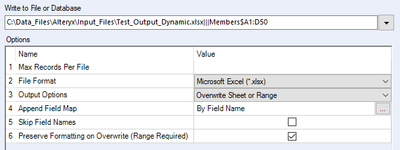

Is there a way to preserve template format in the output spreadsheet in a dynamic output setting ?? If it cannot be done, then another option may be is to create a temp standard file with all the formatting needs, as in the first section above and then to run a command to copy the file to the necessary name ??
Thanks for your valuable suggestions.


