Hi all,
I recently had some conversations with users out there working with the Time Series Tools.
In general they are quite happy with it, but they struggled a little bit with the output on a daily base.
The challenge is the output of the TS Forecast Tool with its Period und Sub-Period. Yeah cool, it is counting up. But what is the real Timestamp behind? What is the meaning of Period 580?
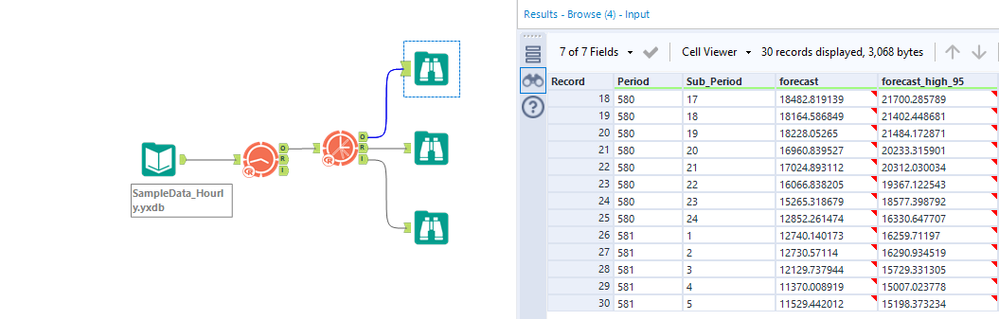
Within the ETS/ARIMA Models you find the option to define a “Series starting period”. But this only works for Week, Month, Quarter and Year as an output.
So you need to calculate it based on the Period output by yourself. That is why I created a Macro to make this task a little bit easier for you folks out there.

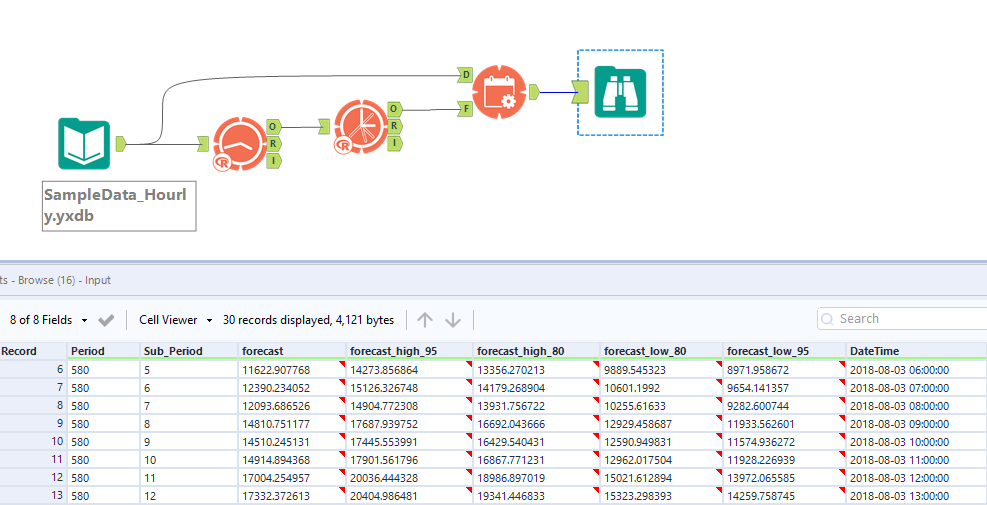
The Macro require 2 inputs.
D-Input takes the original Data to identify the latest Timestamp in your source dataset. Based on this the following entries for the output are automatically calculated.
F-Input takes the values from the TS Forecast output.
In the configuration of the Macro you need to select your Date Column (used in D-Input) to calculate the Forecast Dates.
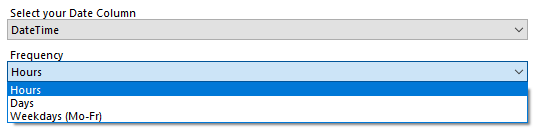
The other Option you need to choose is the Frequency. Here you can choose between Hours, Days and Weekdays as they are not available directly from the ETS/ARIMA Tools.
As an Output you receive the precalculated Timestamp column with the name of your original column.
You can find the Macro in the Gallery here: https://gallery.alteryx.com/#!app/TS%2BDates/60e721500462d70724368be8
Attached you find a sample workflow as well.
I hope this Macro is helpful to some of you out there.
--
David


