Dear Community,
I would like to ask how we can build the formula that able to extract the data as per screenshot below.
I also attached the excel file for your reference.
Many thanks in advance for the assistance
Hello there,
The file you have shown can be split into 2 parts:
1 - Strings that have spaces and can be easily broken down with a TextToColumns tool
2 - Strings with no spacing with a pattern of having uppercase letters, a group of numbers, another upper case, and more numbers
I created a workflow where I use a Filter to separate those parts, the first one I just use a TextToColumns with a space as a delimiter, the second I used a Regex Tool using the Parse Method with the expression "([A-Z]+)(\d+)([A-Z]\d+)". This expression will get the first upper case letters, then the numbers, then the uppercase+numbers.
I used a select tool just to reorganize and rename stuff. Hope this helps!
Hi @SH_94
Inspired by @JoaoLeiteV 's approach here is my take on the usecase.
Workflow:
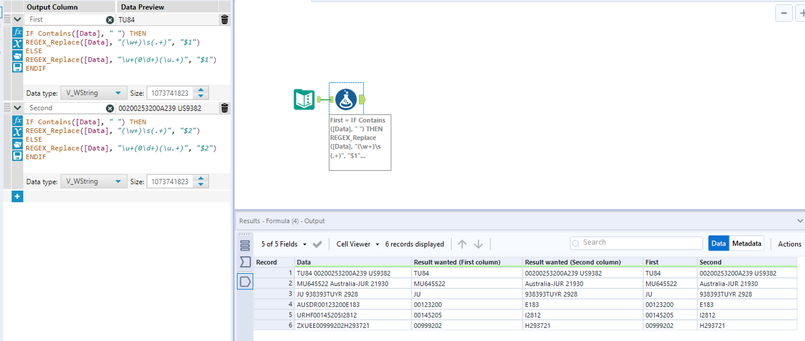
I am using contains([data]," ") to check the pattern type and extract 2 columns based on the pattern using Regex.
Hope this helps 🙂
Hi @SH_94 ,
Here is the workflow:
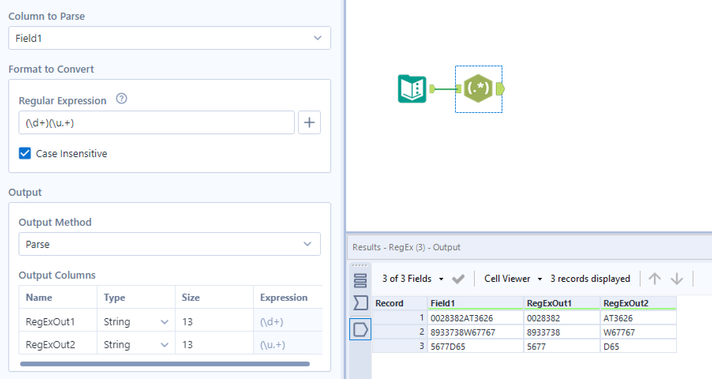
The pattern in this is number letter number. Split needs to be done on first occurrence of letter hence the first group is \d (numbers) and second group \u is starting from letter . ".+" means any characters after that.
Nicely done @JoaoLeiteV 🙂 👍
I was not able to think through how to approach it. Splitting into 2 streams was great idea 🙂 wish I had thought of it 😅
Hi,
Is there any Document / Material to study about the regular expression (Formula)?
Thanks JoaoLeiteV
Dear @JoaoLeiteV ,
May i know how to build the formula below if we have the upper and lower case or All lower case scenario?
Thank you.
As you can see the highlighted option regex is case insensitive you need to uncheck to make case sensitive. You can click on the + button to find out the regex options
you need to match spaces.. try something like:
regex tool in parse mode
(.*)\s(\w{2}\d+)$
and makes sure case insensitive is checked...
Dear @apathetichell ,
Could you briefly explain the meaning fn the formula used?
For your question of:
Thanks a lot for the prompt response. I was trying to use the formula : ([A-Z]+)([A-Z]\d+) for the format below
1. JASON KING HUU AU19233
2. MELVING TANG ANN AUW JU1933
Result wanted
1. JASON KING HUU (First column) AU19233 (Second Column)
2. MELVING TANG ANN AUW (First column) JU1933 (Second Column)
your formula wasn't matching a \s - so any spaces were treated as though your regex didn't match what it was looking for basically preventing you from getting data. My formula look for anything everywhere until a space - but not just any space - a space which is trailed by exactly 2 letters , any number of digits, and an end of the line.
This workflow should work for the data you posted... It uses formula with regex_replace...
(\d+)(\u.+) In regex tool prase mode should work
Dear @atcodedog05 ,
Thank you for the prompt response.
May i know for the formula (\u.+) it will capture starting from letter... No matter the behind is digit,letter or sign?
@SH_94,
Yes thats correct.
May i know if you know the formula to split the setting below:
1. ZURU??/!KUTA
2.EYRI{}:keya
Result wanted (splitting the letter and removing any sign in between)
1. ZURU (first column) KUTA (second column)
2.EYRI (first column) keya (second column)
Thank you in advance.,
+ is one or more characters. In that scenario one or more non letters
@SH_94 just a quick tip, if you want to check what parts of a Regex code you can use Regexr.
You paste the expression on the upper part and then you can hover over parts of the expression and an explanation will appear. Also, in the lower part under "Tools -> Explain" you can see a whole explanation of your regex expression.
I always use this website when working with regular expressions
That's correct, you have to consider your spacebar.
In this case, you need to adapt @atcodedog05 regex to ([\u\s]+)[^\u]+([\u\s]+)
([\u\s]+) - Any combination of letters and spaces
[^\u]+ - Anything that's not a letter
I tested this regex using "HU YU*#^ JUE JUE", just to make sure that if there are some spacebars in the second part, it'll also put the text in the second column.
My regex would be similar to @JoaoLeiteV 🙂