I have three files that come from one of our vendors that I've successfully combined into one output. However, the column headers are for Sales within a given week (i.e. Jan 05 2020 - Jan 11 2020) and I need each of those columns to take on a "date" property so that I can bring this data into Tableau and create a line chart that shows sales throughout the year (end goal).
Current Workflow:
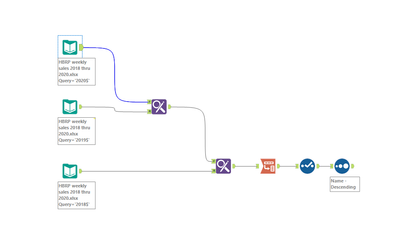
What the data looks like after the three tabs are combined; with the Find and Replace tool.

I transposed the data so that all column headers are under the column "Name".
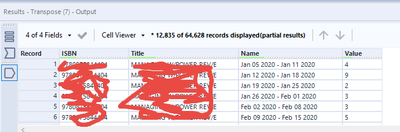
Now, what I'd like to do is parse out ONLY the First date in the column (i.e Jan 05 2020 - Jan 11 2020) to become ONLY Jan 05 2020 in a way that I can then convert it to be a date assuming using the select tool; not text. They are weeks, but theoretically I only need one of the dates.
Please let me know if you have any ideas or can help with the formula and set up I'd use with the Dynamic Rename. And then how I'd finish the workflow to bring the date in to my final output.
Thanks!


