Hi Community,
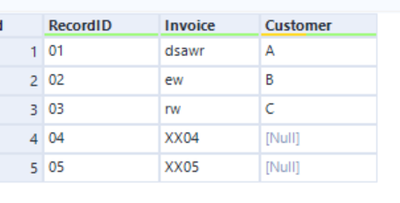
I had encountered the following issue : Empty cell in certain row and my action plan as below:
1. Identify certain column whether it is empty
2. If empty , replace with the certain words as shown in the example screenshot below.
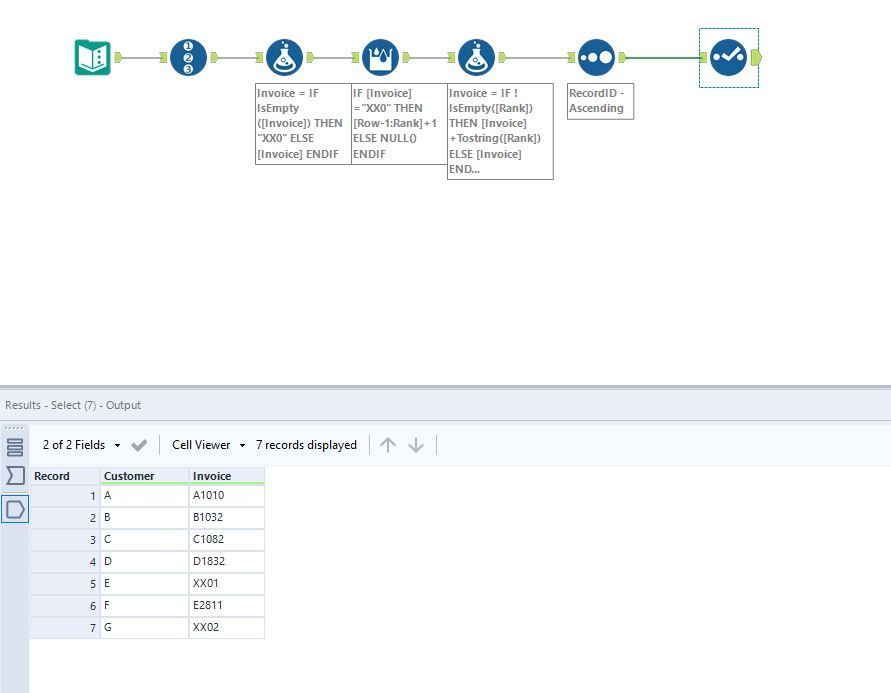
Hi @SH_94 I mocked up and approach to tackle this challenge which uses the formula tool and multi-row tool to update the empty values. Let me know what you think?
Hi @SH_94,
I have prepared a simple solution for you:
In order to make those numbers, I have used a record id.
You can remove the data cleansing tool. I just wasn't sure how to make an empty column.
Hi @SH_94 I amended the workflow to showcase how to make this change.
Hi @ JosephSerpis,
Could you share with me the workflow version 2019.13? As i am not using the latest alteryx.
Hi @JosephSerpis ,
Currently i try add in some requirement on the formula below. Instead of just fill it the blanks with XX0, I want to include the features whereby it will combine with the company code as per screenshot below .
I also attached the result file wanted for your reference. May i know how can i modify the formula so that the tagging with follow together with the company code.