Hi,
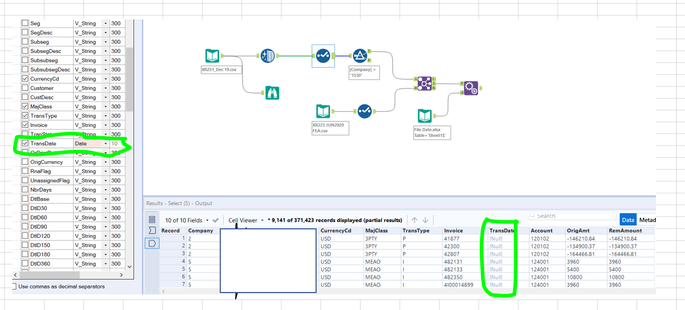
I have chosen the field type as date as shown as screenshot below and it show the null result.
May i know how can we fix this?
Hi @SH_94,
Here is what you can do to solve this issue.
I hope it solves your issue.
@SH_94
What is the format of the data? Alteryx expects a YYYY-MM-DD format for dates. If it is something other than that you'll get the result you're seeing by just changing the data type to date. You'll need to use a datetimeparse formula or DateTime tool to update the data into the proper format. The below is a helpful article.
https://help.alteryx.com/current/designer/datetime-functions
HI @ lukecornetta
The original format was DD/MM/YYY. Can you guide me how to change the format by use a datetimeparse formula or DateTime tool to update the data into the proper format.
As i quite new to this Date Formating function.
Thank you for your help
Is this what you are looking for?
If it solves your issue please mark it as a solution
Hi @ grazitti_sapna 15
Kindly find the file below for your reference.
Hi @grazitti_sapna
If you look at the output , the date for second row is different . Meaning the year from input is 2019 but the output is 2022
Yes. This is what i looking for but may i know how to fix it ?