Hello, unfortunately I can't provide too much information due to sensitive data, but we are running into an issue where our workflow works everywhere but on the Server WHEN we try outputting to a shared network folder location:
- Works in Designer on my desktop and the virtual machine where the Server is installed. I can output to my desktop or the network folder with no issues
- I can use the Gallery to output to my desktop (the files output to my desktop on the VM)
- However, when we try to use the workflow on our Private Gallery and output to our shared/network folder, we get these error messages:
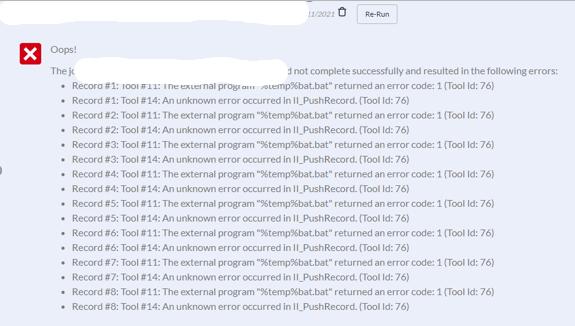
I tried searching these errors but since the workflow works in Designer every time it seemed like that was heading down the wrong path. There are no spaces in the network folder location.
The run command is trying to copy a file from the Supporting Documents of the workflow to the user's desktop or shared location. The files copy over when the workflow works, including using designer to output to the network location. It's only when we try to use the server (our Private Gallery) to output to the network folder that we get these errors. It seems like there is something else needed for the Server to be able to use the run command to talk to the network folder?
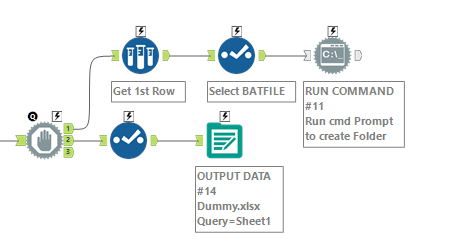
Does anyone know of any other errors/things to look out for when interacting with .bat files and with network folders?
Thank you!


