Hello experts,
I have a dataset (dynamic table) which can have different column names (every time I run the workflow).
For eg, one of the runs give below result. Please note there can be empty records.
| Material | Oracle | JDE | SAP | GMD |
| A | aa | aa | aa | aa |
| B | | aa | | aa |
| C | aa | aa | aa | |
second run might give below result and so on. Column headers keeps changing
| Material | Oracle | JDE | GMD |
| A | aa | aa | aa |
| B | | aa | aa |
| C | aa | aa | |
I want to build a formula after this dynamic table, which returns 'not found' for empty records and default value for filled records.
For eg, for first run table above, formula tool should give below result
| Material | F_Oracle | F_JDE | F_SAP | F_GMD |
| A | aa | aa | aa | aa |
| B | not found | aa | not found | aa |
| C | aa | aa | aa | not found |
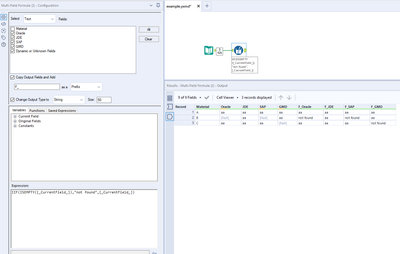
How can I build a dynamic formula tool, which creates new column as F_ColumnName (as shown above) and gives "not found" for blank records and default value for filled records.
Currently, I hard coded the formula names which gives an error if any of the column are missing and we have a corresponding formula for that column. Attached is the sample workflow.
Attached Alteryx workflow, Book1 as input file and picture of my workflow.
Regards, Ravi