I have several workflows where I want to use the preserve formatting but I find a limitation in it that seems to be quite maddening.
With the current output setup:
Overwrite Sheet or Range
With Preserve formatting on
The range is Sheet1$A1:P1000
I have only a header row lightly formatted and a single column with a data validation dropdown
When a new run is completed, all the formatting remains as advertised. Yet, if there is more rows from previous than the newest run, it only somewhat removes the old rows. Leading to confusion among those that need to work the file after it generates.
Example output:
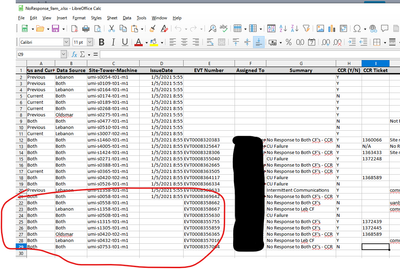
As circled, the rows 22 and on are from previous. The report does remove the "Issue Date" column, but none of the others.
On Version 2020.1.5 of Designer with a server/designer update coming later this month to 2020.3
Hopefully some of you know a fix


