Hi community,
I've the task to load hundreds of planning files that are in xlsb format. Im using the macro and instructions that are given in this article here. To see if the macro works and reduce runtime I only load the planning files for december, which are 10 xlsb files. 1 for each department. When i run the macro from the article I get errors that it cant find the files in the appdata/local/temp folder. After some research on why it can't find several files I found out why:
The macro creates a file in the temp folder for each batchID. Each planning file receives 1 batchID which means the macro would be searching for only 10 file in the appdata/local/temp folder. But this is not the case, it will search for 15 files and will only find the first 10. After researching why it is searching for 15 files I saw that the directory tool outputs 15 record of xlsb files while there are only 10 in the folder. Here is where my question is starting:
I've made a new worflow where only the directory tool is present. I entered the file path to the folder where the 10 xlsb planning files are stored. See the picture below a screenshot of the files in the folder:
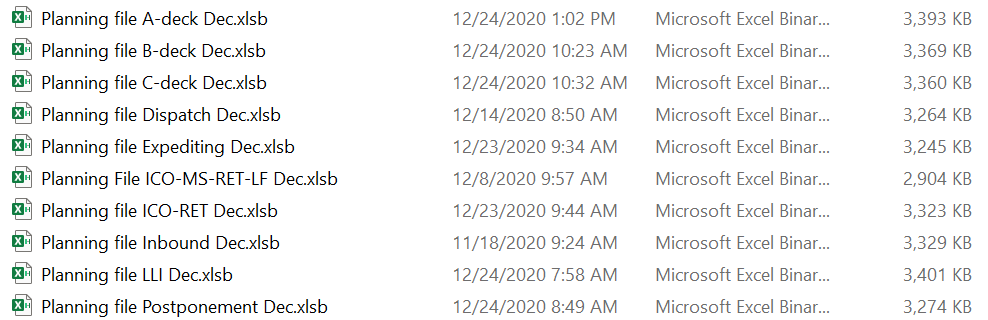
In the configuration of the directory tool I entered the file path of the folder and inserted the following file specification: *.xlsb
I would expect that the directory tool will output 10 records: 1 for each xlsb file.
But the truth is that the directory tool outputs 16 records. Where the first 10 records are the record that I expect to receive and the last 6 records being a sort of duplicates. See the screenshot below the output of the directory tool:
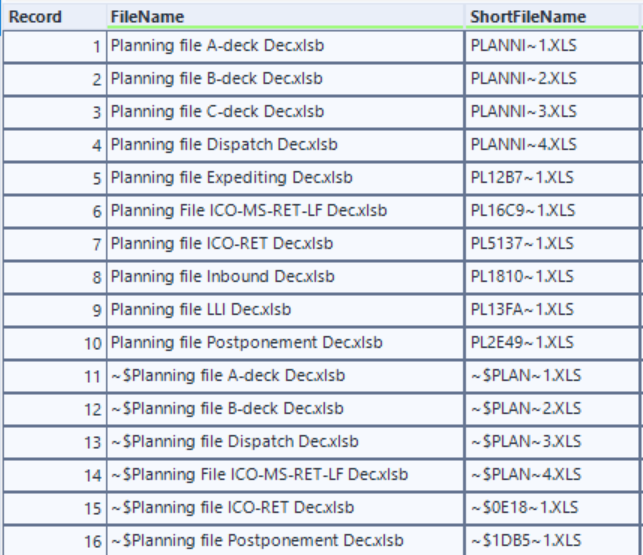
Does anyone know why the directory tool creates these 6 last records starting the file name with ~?
If you have any idea, please let me know.
Thank you beforehand,
Jimmy


