Hi All,
I've a situation like in the snapshot. All I need is to replace "True" "False" with 1 & 0 (1 is True of course). Is there any way through which I can do this in one go rather than going to each column for replacement?
Any hope?
Thanks,
Hi @Deepvijay,
As @Greg_Murray said you could use a multi-field formula to apply a formula to more than one column at a time.
Input:
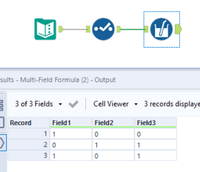
In your multi-field formula tool you'll want to select the fields to convert, select change output type checkbox to convert the field to a byte (or numeric data type) and create your expression. Depending on whether your fields (True/False) are stored as boolean or strings you'll need to use the appropriate formula:
Multi-Field formula tool configuration (using expression for strings):
Bool data type expression:
IF [_CurrentField_] = 1
THEN 1
ELSE 0
ENDIF
String data type expression:
IF ToString([_CurrentField_]) = 'True'
THEN 1
ELSE 0
ENDIF
Output:
If this solves your issue please mark the answer as correct, if not let me know! I've attached my workflow for you to download if needed.
Regards,
Jonathan
You're looking for the multifield formula tool.
https://community.alteryx.com/t5/Alteryx-Designer-Knowledge-Base/Tool-Mastery-Multi-Field-Formula/ta-p/39658
Hope that helps,
Greg
Thank you for your help. 🙂