UPDATE: Workflow attached
I'm pulling in some data from the below link:
https://support.fubo.tv/hc/en-us/articles/115005151127
I'm familiar with using the Text Input > Download > Text to Columns and so on to scrape the URL for the data in a table but this is the first time I have run across a cell with multiple rows like the below:
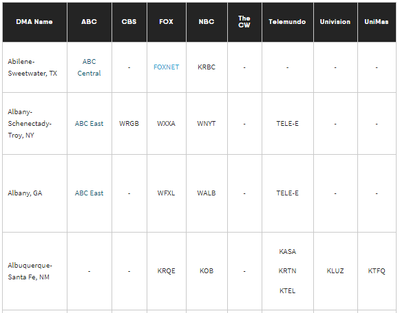
The Albuquerque row comes across as:
DownloadData
<p><span style="font-weight: 400;">Albuquerque-Santa Fe, NM</span></p>
</td>
<td class="wysiwyg-text-align-center" style="width: 65px;">
<p><span style="font-weight: 400;">-</span></p>
</td>
<td class="wysiwyg-text-align-center" style="width: 50px;">
<p><span style="font-weight: 400;">-</span></p>
</td>
<td class="wysiwyg-text-align-center" style="width: 57px;">
<p><span style="font-weight: 400;">KRQE</span></p>
</td>
<td class="wysiwyg-text-align-center" style="width: 60px;">
<p><span style="font-weight: 400;">KOB</span></p>
</td>
<td class="wysiwyg-text-align-center" style="width: 50px;">
<p><span style="font-weight: 400;">-</span></p>
</td>
<td class="wysiwyg-text-align-center" style="width: 88px;">
<p><span style="font-weight: 400;">KASA</span></p>
<p><span style="font-weight: 400;">KRTN</span></p>
<p><span style="font-weight: 400;">KTEL</span></p>
</td>
<td class="wysiwyg-text-align-center" style="width: 73px;">
<p><span style="font-weight: 400;">KLUZ</span></p>
</td>
<td class="wysiwyg-text-align-center" style="width: 58px;">
<p><span style="font-weight: 400;">KTFQ</span></p>
</td>
</tr>
<tr>
<td class="wysiwyg-text-align-left" style="width: 113px;">
DESIRED RESULT:
| DMA Name | ABC | CBS | FOX | NBC | The CW | Telemundo | Univision | UniMas |
| Albuquerque-Santa Fe, NM | - | - | KRQE | KOB | - | KASA,KRTN,KTEL | KLUZ | KTFQ |
My current workflow results split them out into their own cells which then throws the rest of the data off of their corresponding headers.

TIA for any help


