Hi everyone,
I am trying to connect Alteryx to Azure SQL Database for doing data analysis for our project. As there is no custom connector for Azure SQL DB, I am using ODBC driver 17 for SQL Server.
Within the ODBC connection configuration I am using the option:
Azure Active Directory Interactive authentication using a Login ID entered by the user
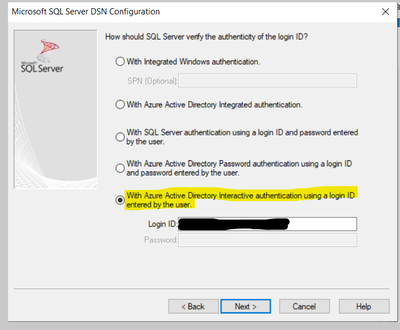
The connection is successful when the Data source is tested.
The issue that I am facing is: When I drag in any tool like In-DB connector, Summarize In-Db, Filter In-Db... I get prompted for authentication from Azure AD every time, multiple times for each tool.
Even after the the flow is designed and I hit the Run button, I get prompted for authentication again a couple of times.
Is it possible to connect just once and the session stays alive for rest of the time? Is there any other better way for connecting to Azure SQL DB?
Note: When I select the option -Azure active directory password authentication using a login ID and password entered by the user, The ODBC connection is not successful from Alteryx and I get the error:
" Error: Input Data (7): Error SQLDriverConnect: [Microsoft][ODBC Driver 17 for SQL Server][SQL Server]Failed to authenticate the user in Active Directory (Authentication option is 'ActiveDirectoryPassword').
Error code 0x800401F0; state 10
CoInitialize has not been called."


