Hi,
I need to remove data from column 1 in column 2, and i can´t find a smart way to do it.
Example:
I need to remove data from the column "Fabrikant" in the column "Produkt_navn".
How do I do this in a smart way?
Hi @C-LOTTE
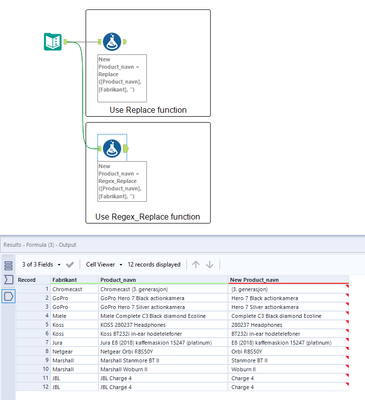
A replace function can do this, as shown in the example below. The normal replace function is case sensitive though, so where you have Koss and KOSS, this won't work.
The Regex_Replace function can be case insensitive though, and in this case you use it without actually using regex!
I've attached an example showing the difference between the 2.
Hi C-LOTTE,
A formula tool will help you get the desired result
If this solves your issue please mark the answer as correct and also hit the like button, if not let me know! I've attached my workflow for you to download if needed.
Thanks,
Abhra Mitra
Hi @C-LOTTE,
Can you please share the input and output data samples?
Hi grazitti_sapna
I have uploadet a sample in an excel sheet with the data. I hope you can work with that.
Hi bhrmitra
I have tried using a formula tool but i can´t find the right formula to use. Do you have an idea?
Thank you for you help DavidP and grazitti_sapna