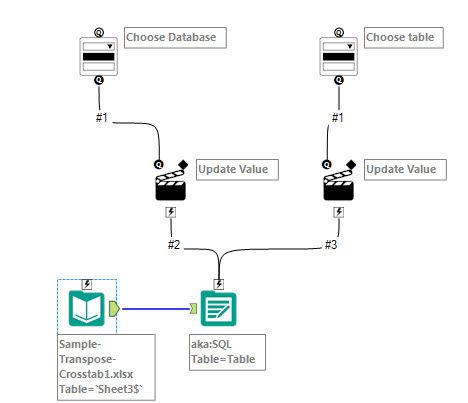
Dear All,
I'm trying to convert one of my Alteryx workflow into an Analytics App and I have a MS SQL Server table that I'm trying to write to. In the Analytics App I want to be able to choose which SQL database and output table I want to write to. Can't seem to find the correct interface tool to achieve this. Has anyone got any ideas on how I should go about this? I have an ODBC connection set up with Microsoft SQL server and I can successfully write to a table that I want by just executing the workflow but just can't seem to find the interface tool to translate my workflow into analytics app and then to choose the database and SQL table via the App.
Please see below screen shot of the workflow with Output Data tool that works with ODBC connection to SQL server,
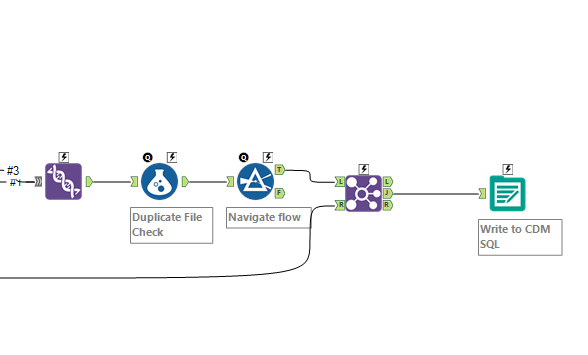 This is a normal workflow that shows how I'm writing into SQL server using ODBC connection
What I then did was tried to use the 'Text box' and 'Action' interface tools to connect to the 'Output Data' tool and see if I can update the SQL database and table name but doesn't seem to work.
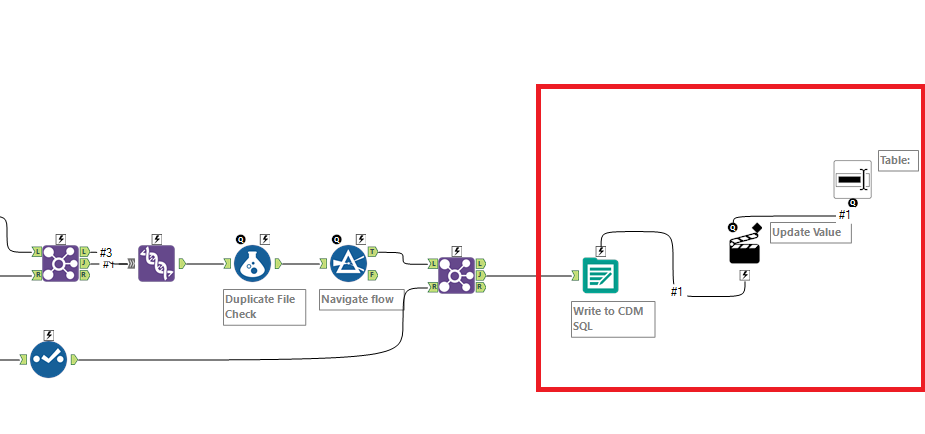
Update value in the 'Action' tool then expects you to update the entire connection string but I don't expect the user who is running the App to know the connection string but instead should simply choose the database 'ACM_Robotics' and SQL table '[02_cdm].[General_Ledger_new]' and then run the App.
I really appreciate any help anyone can offer. Thanks very much.
Regards,
Deepak