Hi Guys!
I'm creating a simple workflow with Run Command Tool, I need to run the macro inside the macro-enabled file. But I want my workflow to be dynamic, So I've inserted a File Browser Tool to select the ".xlsm" file and run the macro using Run Command Tool.
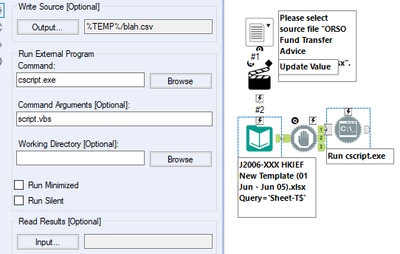
And this is my VBScript:
dim fso: set fso = CreateObject("Scripting.FileSystemObject")
dim CurrentDirectory
Set objExcel = CreateObject("Excel.Application")
CurrentDirectory = fso.GetAbsolutePathName(ThisWorkbook.Path)
Set objWorkbook = objExcel.Workbooks.Open(CurrentDirectory & "\*.xlsm")
objExcel.Application.Visible = True
objExcel.Application.Run "ClearContents"
objExcel.ActiveWorkbook.Save
objExcel.ActiveWorkbook.Close
objExcel.Application.Quit
WScript.Echo "Finished."
WScript.QuitFor eg. I've selected the ".xlsm" file using File Browser Tool, How can I use that file and run the macro inside that file that I've select.
As you can see in my VBScript I've set the path and filename static. How can I change that base on the file that I've select?


