Hi all,
I have an Excel sheet that contains several thousand rows of data about systems in use for various projects, as well as instances that have gone up and down in different months. Like this:
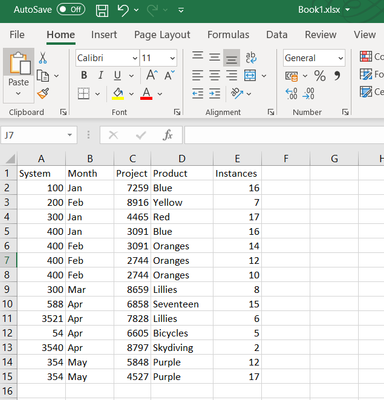
What I need to do:
- For each system in column A, I need to create a new Excel workbook (e.g., System_400.xlsx)
- For each month in column B, I need to create a new tab in that workbooks (e.g., Jan and Feb)
- For each Project and Product, I need to sum the instances (this is easy in the Summarize tool)
The end result would look like this:
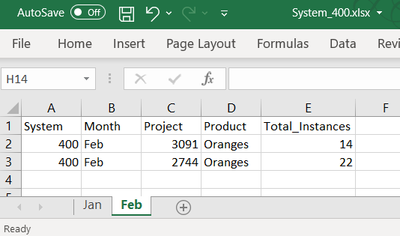
I do NOT have a list of the systems in column A, so I think they would need to be enumerated (e.g., via Group By in the Summarize tool) to tell a macro what to do. I imagined getting that list and using it to feed a filter, selecting just the system in question for a particular Workbook, then using the field for the Data Output. But I don't really know my way around macros and they don't feel intuitive to me. I guess I need a batch macro because it should run for each system in the enumerated list, but after that I'm stuck. Help? 🙂


