Dear all,
We created a powershell script in order to open/refresh/save/close an Excel file.
The script is called via the "Run command" tool in Alteryx as follows:
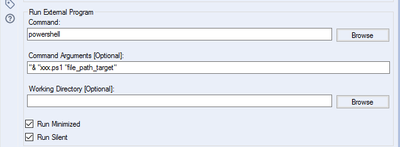
Powershell code:
Param ([string]$pfad_target)

$a = New-Object -ComObject "Excel.Application"

$a.Visible = $false
$a.displayAlerts = $false

$b = $a.Workbooks.Open($pfad_target)  #line triggering the error
$b.RefreshAll()
$b.Save()
$b.Close()

$a.Quit()
Problem:
The workflow runs well while being executed in the local Alteryx Designer and via Remote on the Alteryx Server Designer.
However, if the workflow was uploaded to the Alteryx Gallery (Private Studio) the script shows the following misbehaviour:
- The user has to specify its credentials to run the workflow --> while logging $env:USERNAME we can see, that the username has the same credentials as defined in the Alteryx Gallery
- The script stops at the command "$b = $a.Workbooks.Open($pfad_target)" --> showing the error message "Microsoft Excel cannot access the file ..."
Curious:
- When executing the workflow in the local Designer and via Remote on the Alteryx Server Designer --> The Microsoft Excel process appears in the Task Manager being executed with the correct Windows user credentials
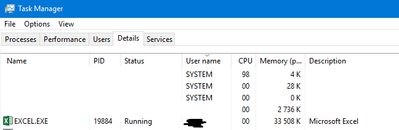
- When starting the workflow via the Alteryx Gallery --> The Microsoft Excel process appears in the Task Manager of Windows Server being executed with the "SYSTEM" user (Please note, while logging the powershell script the $env:USERNAME still shows the correct Windows credentials)
Server version:
- Client: 2019.3.17947
- Server: 2019.3.5.17947
- Server Binaries: 2019.3.5.17947
- Service Layer
Designer version:
Could you please advise what is going wrong here?
Thank you & best regards


