I am trying to input multiple excel files using an input path that is "folder name"\*.xlsx and am getting the schema error attached. All of the files only have one sheet named "Sheet1". Attached are a sample of the files I am trying to upload.
Hi @vandecx17 ,
This is happening due to a different format in a specific column. Since some columns are blank, it is reading as text where it should be a number.
I suggest you to lock all the columns as text and change to number in Alteryx.
Best,
Fernando V.
These four files that you attached to the question get read fine in my designer
Hi @vandecx17, looking at the screenshot in the word doc., it looks you are pulling in the file B_2_0_Rates_2020_Feb.xlsx which has the tab 'b20 MASTER' which I am guessing has a different data structure than the other 4 files you shared with us.
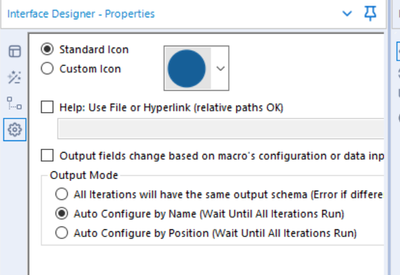
Typically if one is looking to read multiple files from a given folder using the normal input tool, Alteryx assumes all files being read have the same structure. But in the event you have different structures across files, you could create a macro and select the option from View>>Interface Designer Tools>> Select the Option shown in the image below:
I have also attached a sample solution for your ready reference. Please mark this post as solution accepted if it answers your question.
Thank you, Fernando! How would I lock all the columns as text and change to number in Alteryx?