Hello #AlteryxFam!
I was provided with a large number of just over 256 Profit and loss accounts for 256 branches of a business, each one in seperate tabs of an Excel spreadsheet: one tab for each one branch.
I have (successfully!) extracted the financial KPIs I needed to out of that haystack and enjoyed the thrill of solving! But I thought I'd reflect back on the hackerish way I solved it and think if there's a more elegant way of solving this.
I got really acquainted with the "Cache and Run Workflow" command (256 tabs takes ~ 256 seconds to process, yuck), used an Input Data tool to extract the tab names I wanted, fed it in to a Dynamic Input tool to grab the tabs as a single data frame, then used a Formula and a Multi-Row Formula to add a column with the original name of the tab as the data source to every row (helpfully, the tab name was replicated on the tab itself as the first cell). I extracted the data in a format suitable for Tableau and ran it in Tableau. Which is fine for Tableau.
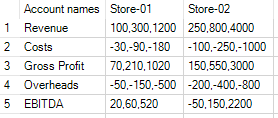
But I'm thinking I may need to provide the dataset in Excel for other users, the shape of the data is something like this:
I have the stores going in sequential order across the top in Columns,
and the account names in the Rows.
Each cell I have data that represents: ThisMonth, ThisQuarter, ThisYear.
But I want to extract the data from within the (comma separated) cells AND to rename the columns to reflect the dimensions of the data
So I ought to get
| | Store-01-ThisMonth | Store-01-ThisQuarter | Store-01-ThisYear |
| | ThisMonth | ThisQuarter | ThisYear |
| Revenue | 100 | 300 | 1200 |
| Costs | -30 | -90 | -180 |
| Gross Profit | 70 | 210 | 1020 |
| Overheads | -50 | -150 | -500 |
| EBITDA | 20 | 60 | 520 |
any thoughts? I attach a workflow with dummy data.


