I've been inputting some CSV files saved from Cognos Query Studio (QS) into Designer 2019.1.6.58192.
QS has saved the files as tab separated rather than comma separated which has been fine, I've opened in Excel and done a Save As to fix this. However I've one file with over 5 million rows that can't be opened in Excel..
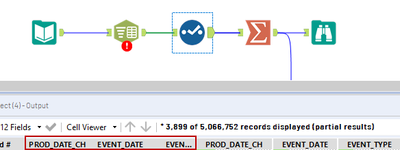
I've loaded it into Alteryx and used the text to columns tool to split out the 12 columns with \t delimiter. That worked just fine. But adding on a Select tool next to remove the original column doesn't. The column remains. I managed to get rid of it by using a Summarise tool with Group By on every column apart from the original one I want to get rid of.
After running with no errors, the Text to Columns tool later starts to report a "field '[original column name]' is not contained in the record" error, even though it is, and running the workflow again gets rid of this error for a few moments.
Here's the workflow with the problem column highlighted after the Select event has run to remove it.