I have a Date column that is formatted like this -- 2018-01-08.
I want to add a specific time to that date so that the column is a DateTime that looks like this -- 2018-01-08 06:00:00.
I need the time to be 06:00:00.
I have tried all manner of formula and parsing, but I can't get it to not throw an error. Here are the last thing two things I tried.
#1 --
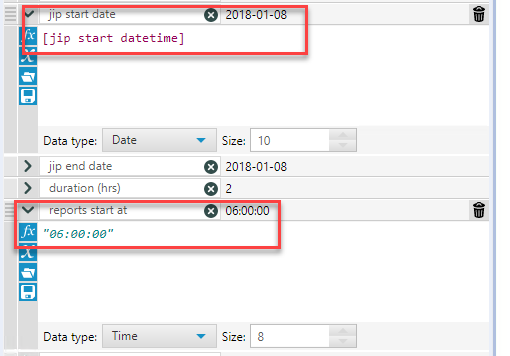
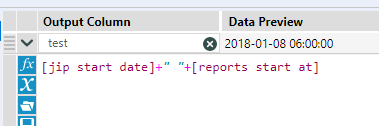
(Note: in the above the test column is formatted as a DateTime. I didn't really expect this one to work because I am concatenating a string. I did also try wrapping DateTimeFormat function around this but it wouldn't work with the time.)
I get an error that "06:00:00 is not a valid DateTime".
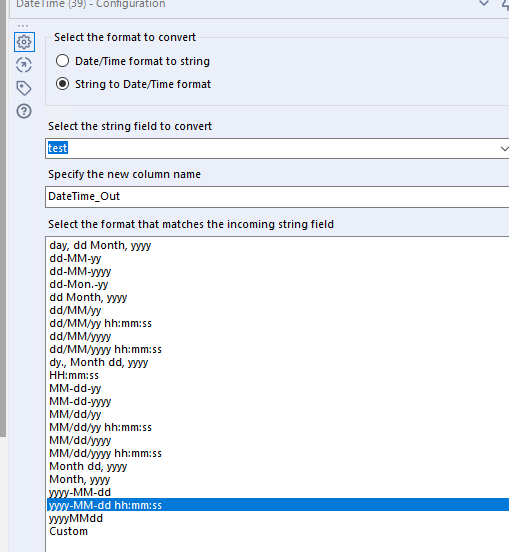
#2 I have also tried taking the output of the test column, changing the data type to string, and then running it to thru the DateTime tool but that gives this error -- ConvError: DateTime (39): DateTime_Out: Cannot convert " 06:00:00" to a date/time with format "%Y-%m-%d %H:%M:%S": Expected separator '-%m-%d %H:%M:%S', got: ':00:00' Record #6178. I have also tried changing "06" to "6"... but that doesn't work.
Super frustrating. I know I've done this task before but can't find it in any of my old workflows. Thanks in advance.


