Hi - i've almost got this working, in fact I think it did work, but its not now 😞
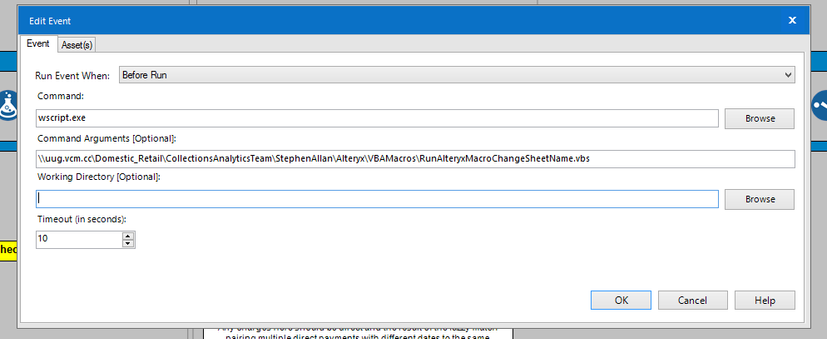
I'm using the Event tool to run the below VB code before my workflow. The VB code should open up a saved excel file and run a VBA macro saved within.
I tihnk my problem is with the below code. I borrowed it from another post and it seems to have too many arguments. I want to run the macro ChangeSheetName, which itself will open many files in a folder, so I dont see why I have GetFolder in the VB code.
Can anyone help with the code to change it to what I need - open the excel - run the macro - when the macro is complete (or say 10sec later) close the Excel (doesnt need to save).
dim objExcel
set objExcel = CreateObject("Excel.Application")
objExcel.Visible = TRUE
objExcel.DisplayAlerts = FALSE
Path1="\\uug.vcm.cc\Domestic_Retail\CollectionsAnalyticsTeam\StephenAllan\Alteryx\AlteryxMacros.xlsm"
Set objWorkbook = objExcel.Workbooks.Open(Path1, 0, True)
Dim fso, path, file, recentDate, recentFile
Set fso = CreateObject("Scripting.FileSystemObject")
Set recentFile = Nothing
For Each file in fso.GetFolder("\\uug.vcm.cc\Domestic_Retail\CollectionsAnalyticsTeam\DCA\Invoices\Input\").Files
If (recentFile is Nothing) Then
Set recentFile = file
ElseIf (file.DateLastModified > recentFile.DateLastModified) Then
Set recentFile = file
End If
Next
If recentFile is Nothing Then
WScript.Echo "no recent files"
Else
objExcel.Workbooks.Open recentFile
End If
objExcel.Run("AlteryxMacros.xlsm!ChangeSheetName")
objWorkbook.Saved=False
objExcel.quit
So the above is saved on my drive as "RunAlteryxMacroChangeSheetName.vbs"
vba macro code within the excel
Sub ChangeSheetName()
Dim strPathh As String, strFile As String, counter As Long
strPath = "\\uug.vcm.cc\Domestic_Retail\CollectionsAnalyticsTeam\DCA\Invoices\Input\"
strFile = Dir(strPath & "*.xl*")
Application.ScreenUpdating = False
Do While strFile <> ""
With Workbooks.Open(strPath & strFile)
.Sheets(1).Name = "Sheet1"
.Close SaveChanges:=True
End With
counter = counter + 1
strFile = Dir
Loop
Application.ScreenUpdating = True
MsgBox counter & " files altered. ", vbInformation, "Process Complete"
End Sub
The macro code does what I want it when it runs from the excel, I just cant get it to run via the event calling the vb code
Any help would be much appreciated.
Thanks
Ste


