Hi!
I've been trying to use workflow constants as a way to switch Postgres and MySQL connection strings for all input tools in a workflow.
Does anyone have a better method or suggestions for improving this?
Have run into a couple of issues:
1. it doesn't seem reliable (can't get it to work with some connections, though that could be me)
2. where it does work, you can't then edit or change the table or SQL select in the standard input dialog
I had seen these two posts which gave me the starting point:
https://community.alteryx.com/t5/Alteryx-Designer-Discussions/Dynamically-change-ODBC-connection-string-for-output/m-p/318722 solved by @MarqueeCrew
https://community.alteryx.com/t5/Alteryx-Designer-Discussions/Use-connection-string-in-a-expression/m-p/417581 solved by @LukeM
Here's what i did:
1. add the workflow constant
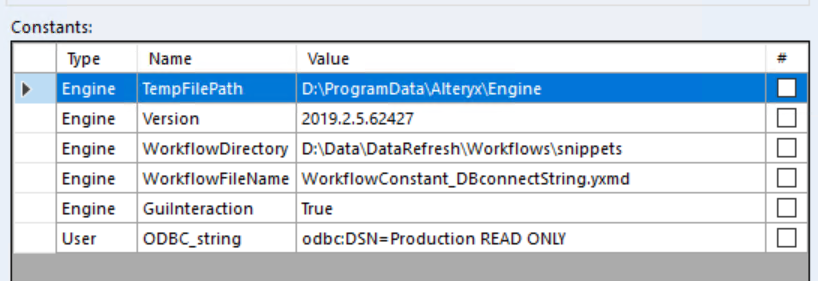
2. I then added the input tool and used the workflow constant %User.ODBC_string% as the connect string. This failed as there was no table specified. So i instead used a full normal connection string, let it validate, and then replaced the connection string with the workflow constant. That worked.
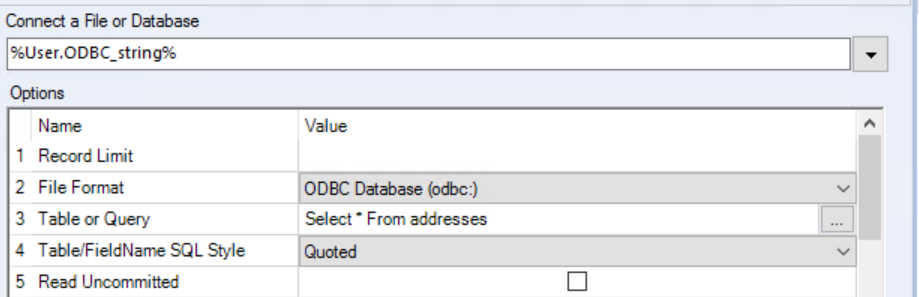
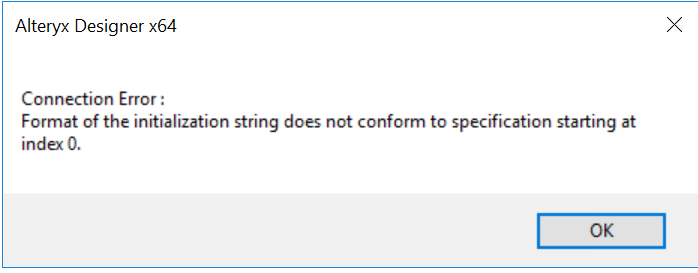
3. but I cannot then go and edit anything about the connection such as the "table or query" value. This makes it quite cumbersome to go and set this up or to modify anything about the data later. If you try (by clicking the ellipses in row 3 of the config, you get this:
Thanks!
Pete


