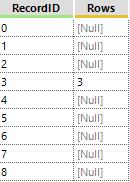
how can I set value 0 for all rows before row =3 and all rows to 1 after row =3 ? and maybe with the help of record ID?
@SM2 ,
i see here is an updated solution. please let me know if this works.
Hi @SM2,
I achieved this with the use of two formula tools and a multi row, then used the select tool just to clean up the columns.
(1) Formula replaces Null values with 0 in [Rows] field
(2) Multi row creates a new field [RunningTotal], containing a running total of [Rows] field
(3) Formula embeds logic to check [Rows] field against [RunningTotal] field to determine whether the row is above (and should return 0) or below (and should return 1)
If this solves your issue please mark the answer as correct, if not let me know! I've attached my workbook for you to download if needed.
Regards,
Jonathan
hi @SM2 ,
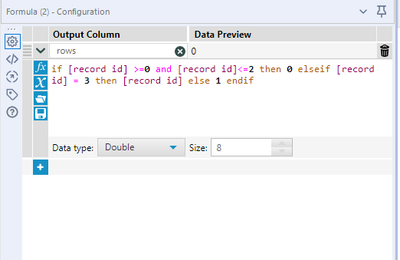
you can use the formula tool to build out the if statement.
i hope this helps!
thank you @bpatel
sorry forgot to mention that its not always the case row =3. so we can have row =2. so technically the way to think about it is if RecordID=Rows then everything before that is 0 else 1
thank you both @Jonathan-Sherman and @bpatel . Both solutions work for me!