
This article is part of the Tool Mastery Series, a compilation of Knowledge Base contributions to introduce diverse working examples for Designer Tools. Here we’ll delve into uses of the Fuzzy Match Tool on our way to mastering the Alteryx Designer:
Similar to the Excel Fuzzy Lookup, the Fuzzy Match Tool makes it easy for a user to perform inexact matches in their data. By specifying similarity thresholds, utilizing varying matching algorithms, and specifying other configuration options, you can customize the tool to best fit your data set. Due to the high degree of customization in the tool, we recommend ramping up to speed with our introductory and intermediate live training videos if more complex applications of the tool are anticipated. We also have a list of frequently asked questions and Fuzzy Matching Tips and Tricks that can supplement your use of the tool as well!
In life, there are few things black and white. There are gray areas everywhere and the lines that separate can be a little fuzzy. The same holds true for data – especially when it’s human entered. That’s why we have the Fuzzy Match Tool – if your data isn’t clear as day, you can still get value out of your records by matching them to something a little more standardized. This can be useful when:
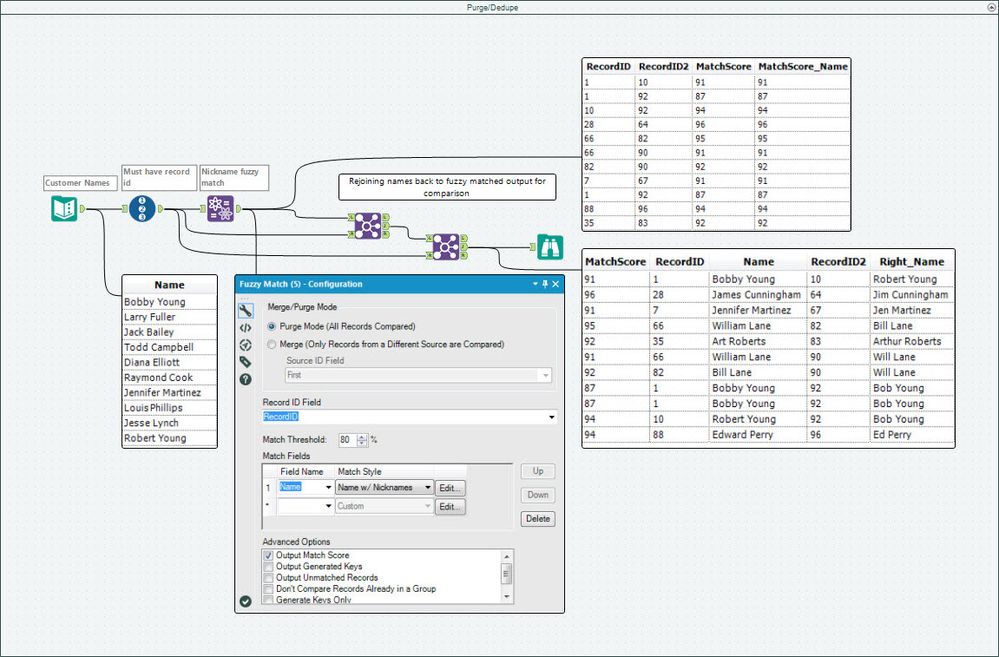
- Purging (deduping) a singular dataset of duplicate records (attached in Fuzzy Match.yxmd):
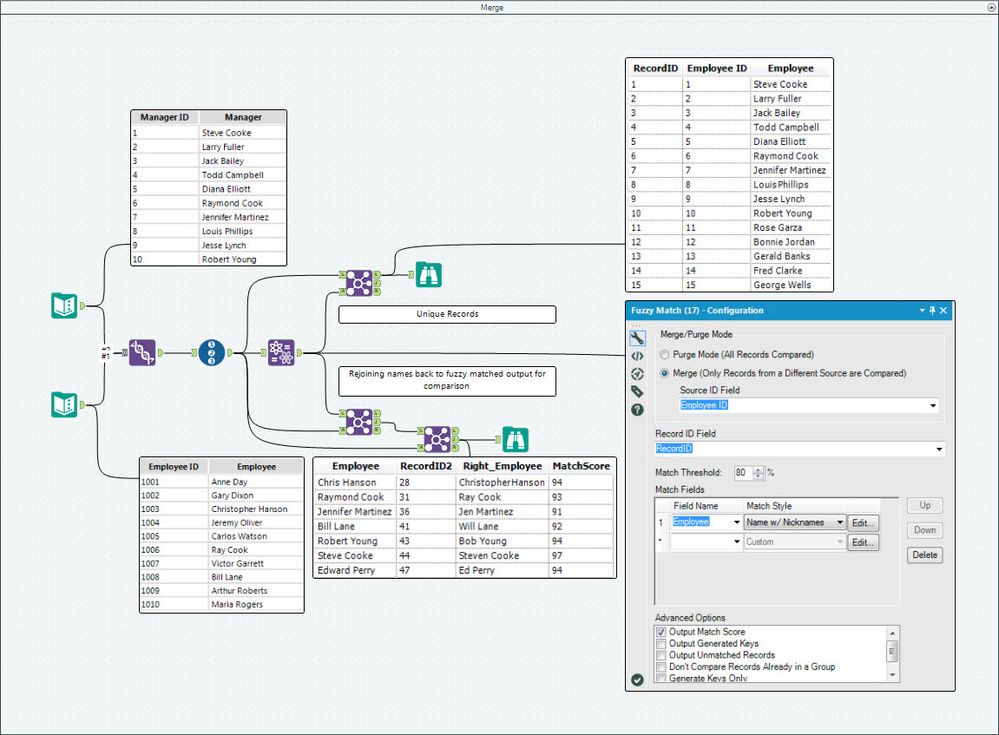
- Merging two datasets and identifying redundant records (attached in Fuzzy Match.yxmd):
Note: It is highly recommended to first purge (dedupe) each of your merging datasets before using them in merge mode so as to eliminate any redundant matches - this will speed up the matching process considerably.
These techniques will help you identify similar names, addresses, phone numbers, and even misspelled words in your data that will help make inexact strings into exact analyses!
If you’re working specifically with names, be sure to check out our guide to nickname fuzzy matching. If you find yourself having to loosen the Match Threshold to the point where some strings are incorrectly matching, but you still aren’t getting others, try “waterfalling” the matching process with another Fuzzy Match Tool just for the lower threshold strings you’re looking to add and union them back to the matched set.
By now, you should have expert-level proficiency with the Fuzzy Match Tool! If you can think of a use case we left out, feel free to use the comments section below! Consider yourself a Tool Master already? Let us know at community@alteryx.com if you’d like your creative tool uses to be featured in the Tool Mastery Series.
Stay tuned with our latest posts every Tool Tuesday by following Alteryx on Twitter! If you want to master all the Designer tools, consider subscribing for email notifications.
Additional Information
Click on the corresponding language link below to access this article in another language -


