Hi everyone!
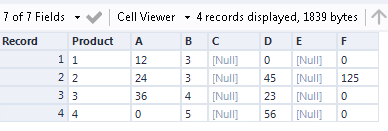
I'm creating a data cleaning workflow to populate a table similar to the one below.
When there is data in the brand A column and there're only a few nulls, I want to replace it with zeros to use in other calculation.
However, when the whole column is null, I have formula to calculate it from the other columns. The condition for these later formula is that one of these three columns is all null, so I don't want to just turn all null values to 0.
Is there a formula I can use for this situation? What do you think is the fastest, most simple way to do it?
I used this to turn Null to 0 before moving on with the other formula, but I would like to know if there's a better way:
IF Average([Brand A]) >0 and [Brand A] = Null() then 0 else [Brand A] endif
| Product | Brand A | Other brand | Total |
| 1 | 12 | 3 | |
| 2 | 24 | 3 | |
| 3 | 36 | 4 | |
| 4 | | 5 | |
| Product | Brand A | Other brand | Total |
| 1 | | 3 | 15 |
| 2 | | 3 | 27 |
| 3 | | 4 | 40 |
| 4 | | 5 | 5 |