I have created an app which outputs 5 reports into one excel workbook (so five sheets). I would like to format each sheet so that the columns are pre-sized, headers are highlighted, and there the columns have a banded color.
I've painstakingly followed and tried many suggestions from other questions, yet none have worked. Most of these attempts have been using a template.
What I am currently trying, is to start with a template which holds some placeholder data. I highlighed the area which would be replaced, and clicked 'Define Name'. I did this for each sheet, then saved and closed the template.
(full disclosure, I'm not exactly sure what the need for this 'Define Name' step is for...It just seemed to be a necesssary step on this site http://community.alteryx.com/t5/Alteryx-Knowledge-Base/How-do-I-output-to-an-Excel-template-file/ta-p/1244 )
Next, I went into my workflow, wrote to this file and the specified sheet, and put 'Delete Data and Append', so that the placeholder data will be deleted but the formatting will remain.
ex: where SandO is the sheet name
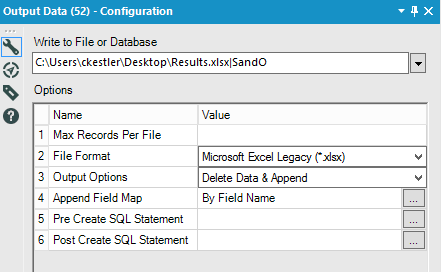
When I push play, my data get's written to the file, but each output becomes a new sheet with no formatting, named, for example 'SandO1'. It also takes FOREVER for the file to open.
What gives?
I've also tried outputting to a specified range, as per another suggestion, but I get all sorts of errors..
Help!
I've attached my workflow.


