This article is part of the Tool Mastery Series, a compilation of Knowledge Base contributions to introduce diverse working examples for Designer Tools. Here we’ll delve into uses of the RegEx Tool on our way to mastering the Alteryx Designer:

The RegEx tool is kind of like the Swiss Army Knife of parsing in Alteryx; there are a whole lot of ways you can use it to do things faster or more effectively, but even if you just use the blade it's still immensely useful. Sometimes that's all you need, but if you do take the time to figure outhow to use a few other tools in that knife, you'll start to see that there isn't much you can't do with it.


Before and after using the RegEx tool.
RegEx: What is it good for?
RegEx is an abbreviation of Regular Expression,and you can essentially think of it as anotherlanguage. It uses symbols just like any other language, but in regular expressions these symbols are used to match sequences of letters, numbers, or characters in text. It's a language that's all aboutrecognizing patterns.
Humans are really good at this sort of thing - let's say I gave you this block of text:
3345 Michelson Drive, Suite 400,Irvine, CA 92612
12303 Airport Way, Suite 250, Broomfield, CO 80021
Two North Riverside Plaza, Suite 1430, Chicago, IL 60606
You'd have no problem telling me these are addresses, and what part is a street number or a city name. But a computer would just see a block of text, and it wouldn't care to check if it was an address or not. RegEx is one way we can 'recognize' useful data in text. Let's 'translate' this to a RegEx version:
| 3345 | ^\d+ | The ^signifies the beginning of a line in RegEx, so it's good practice to include it with your initial pattern. Here, our pattern is\d which means 'any numerical character' (0-9). The+signifies that we want to match theprevious expression oneor more times. Since the first part of the address is a street number, this allows us to have a number of any length. |
| Michelson Drive | [^\d]+ | To match the street, we have to allow our expression to pick up multiple words of characters, including any number of spaces, since streets will often be longer than one word. One way to match this is bywhat we don't expectusing[^...]. This grouping notation matches 'any character not listed here'. What we end up with is matchone or more times any character that isnot a number. |
| Suite 400 | .* | The next part of the address is a suite number, which may or may not be present, and could potentially take on various naming conventions. In order to define a flexible expression to match anything we see there, we can use a . to match 'any character'. The* then signifies that we can match any characterzero or more times. |
| Irvine | [^\d]+ | As before, this just means 'any character that is not a number'. |
| CA | \u{2} | To match the state we can make use of \uto signify 'any uppercaseletter'. Since we're expecting this to always be a two-letter sequence, we can also specify the length of the match by using{...} after our expression, or 'match any two uppercase letters'. |
| 92612 | \d{5}$ | The zip code will likewise come in as 5 digits, so we can do something similar to say 'match five number characters'. Then, we can tack on $to signify that we're expecting this to be the end of the current line. |
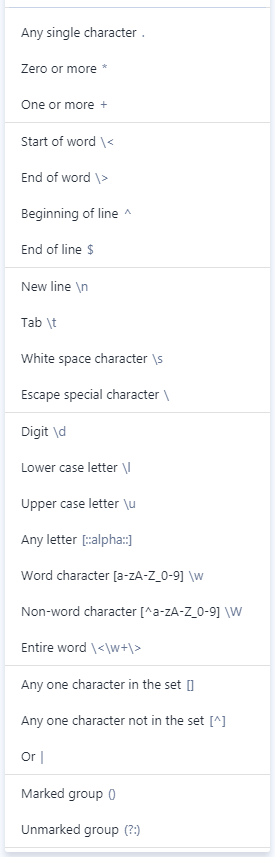
Tools of the trade
There are quite a few symbols used to build RegEx expressions, but Alteryx provides a nice little 'cheat-sheet' right in the tool for you.
You don't really need much more than this to get rolling with using RegEx, and much like in Alteryx, you'll find that there are many many different ways you can create an expression to match a pattern.So don't sweat the details too much, and don't be afraid to spend some time with the good old fashioned "guess-and-test" method of learning.

Don't worry, I'm classically trained.
For more complete guides on RegEx, you can also turn to the Boost-Extended Format String Syntax Guide, as well as the RegEx Perl Syntax Guide.
Alteryx has structured RegEx functionality into four methods: Match, Parse, Replace & Tokenize. Our help documentation for these methods is very good as well.
Match
TheMatchmethod simply checks to see whether a string can be described by the given regular expression, and gives you aTrueorFalse . Let's use the expression elements in the table above to match our addresses. Youcan create one long expression by just putting them together and including spaces\s and commas, wherever theyappear.
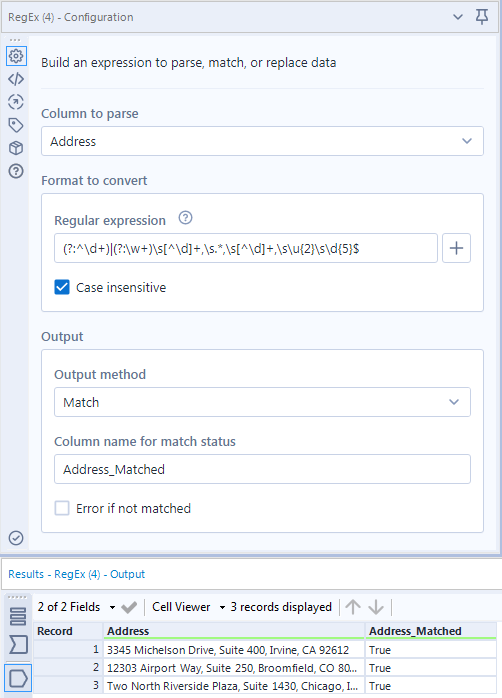
The first two addresses match just fine using this expression, butthe third address strays from what we expected to see and fails. Due to an obscure rule about buildings that share a name with their address, the street number is spelled out and our regular expression is unable to match it.
The key to writing a good RegEx is foreseeingthese exceptions in your data, and accounting for them within the expression. In order to match the 'Two' in this address, let'sput in another expression to check if and only ifthis one fails to match. Most addresses will start with numerical characters, but if they don't then this expression will check for a word instead. Here's how it looks:
(?:^\d+)|(?:^\w+)
This is a lot simpler than it looks, and really just uses two additional RegEx symbols. Thepipe symbolImeans 'or'. For example,a|b would just check ifamatches, and if it doesn't, ifbmatches. The second symbol is (?:...), also known as anunmarked group. This is just a way for us to group these things together for theoroperation.
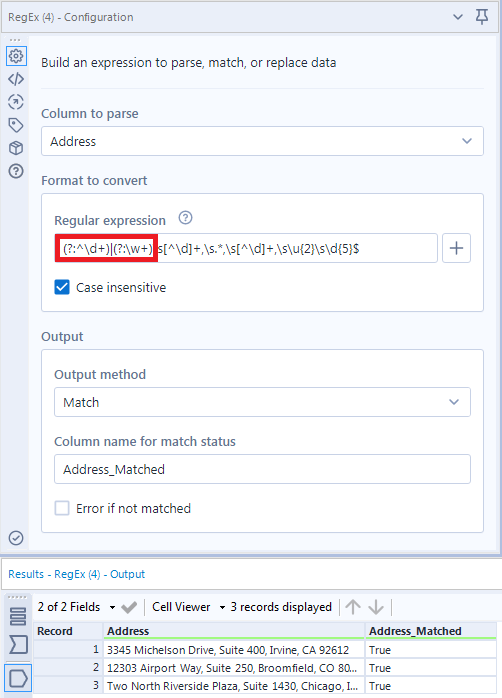
In summary, the first group here (?:^\d+)is just doing the same thing as before, but when it fails the expression tries to match the second group(?:^\w+). This lets us match the word version of our address above without an issue.
For more onMatch:
Extra Credit:There are many ways to structure RegEx; comment below with a better alternative for(?:^\d+)|(?:^\w+). Why is it better?
Parse
Matching is nice in that you can use it for validation, but theParsemethod is really when RegEx comes into its own, allowing you toextractuseful information out of a block of text. The RegEx tool makes this easy for us - all we need is to place parentheses (...)around each thing we want to pull out. These are calledmarked groups - the counterpart to ourunmarked groups above (?:...).
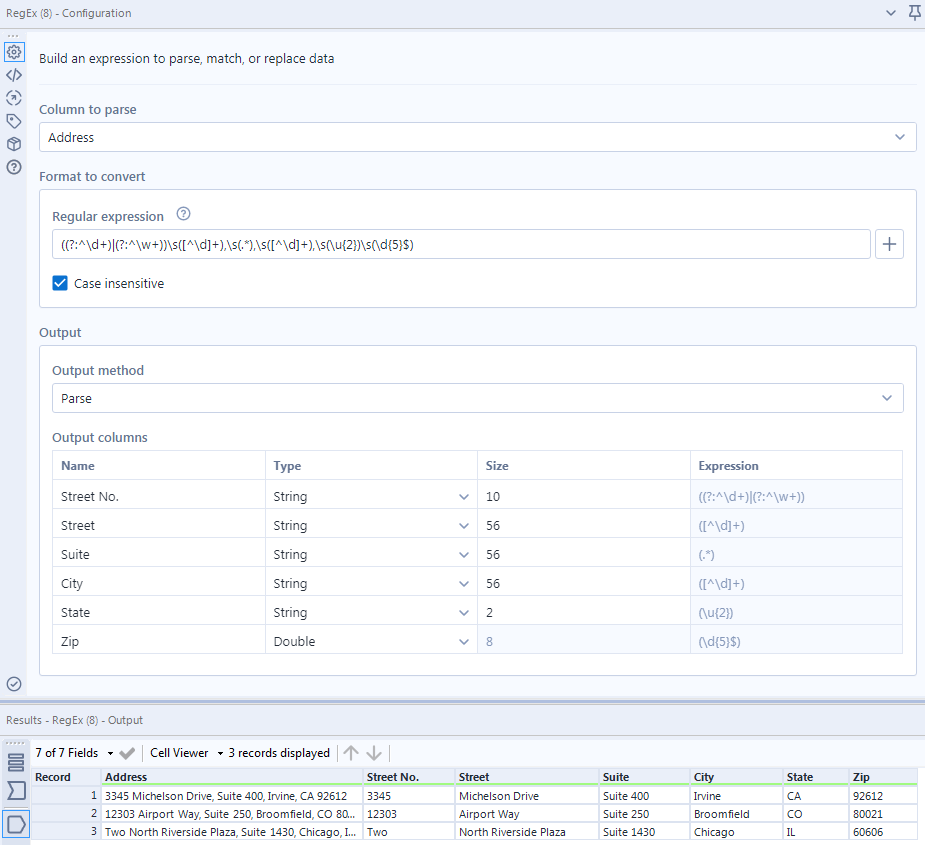
As you type in the parentheses, you'll see these pop into a Select tool style Output Fieldswindow, which allows you to rename your fields and change their datatypes.
For more onParse:
Replace
As you can see, theParsemethod is really just an extension ofMatchthat allows us to pull stuff out of text and place it neatly in a new column. Well, what happens when we extend this concept and ask ourselves, 'How can I put stuff back in?'That's where theReplace method comes in.
WithReplace, we can parse components of our string, replace them, and even rearrange them. We can do thisby specifyingmarked groupsto tell the RegEx toolwhat to replace and where, in a language anybody can understand...

The dapper sloth is absolutely right of course, we can use dollar signs$ along with numbers to specify each exact marked group. For example, $1, $2, and $3refer to thefirst, second,andthirdmarked groups, respectively. So for our list of addresses, if we just wanted to parse out a list of city-states, we cantype inthe expression$4, $5.
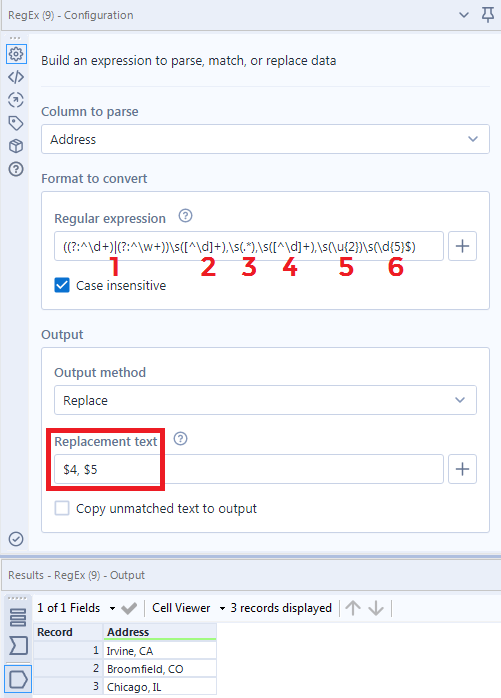
Note we were able to add in our own little comma there, and a space, just by typing in that text box. TheReplacemethod is very flexible, and you can also use it from the Formula tool withthe function Regex_Replace.
For more on Replace:
Tokenize
RegEx is pretty nifty when things are given to us in a nice, neat list, but what happens if all of these addresses are just unceremoniously dumped out by some API call or database as a single block of text?
3345 Michelson Drive, Suite 400, Irvine, CA 92612,12303 Airport Way, Suite 250, Broomfield, CO 80021,Two North Riverside Plaza, Suite 1430, Chicago, IL 60606
Well, this isn't very useful - it's all comma-delimited, but we have no easy way of knowing when one address ends and another begins. What we need here is theTokenize method, which will take that chunk of text and split it into columns or rows, much like the Text to Columnstool. There are two important differences that set RegEx Tokenize apart:
- Instead of matchingon what you don't want (like a comma), you match on what you do want (everything else).
- You have the option of choosing what's split out and what is ignored by using amarked group.
This may sound topsy-turvy, but it actually gives you a lot more flexibility in what/how you split your data. To illustrate, let's split our address text blurb up into multiple rows, using the comma as our delimiter.
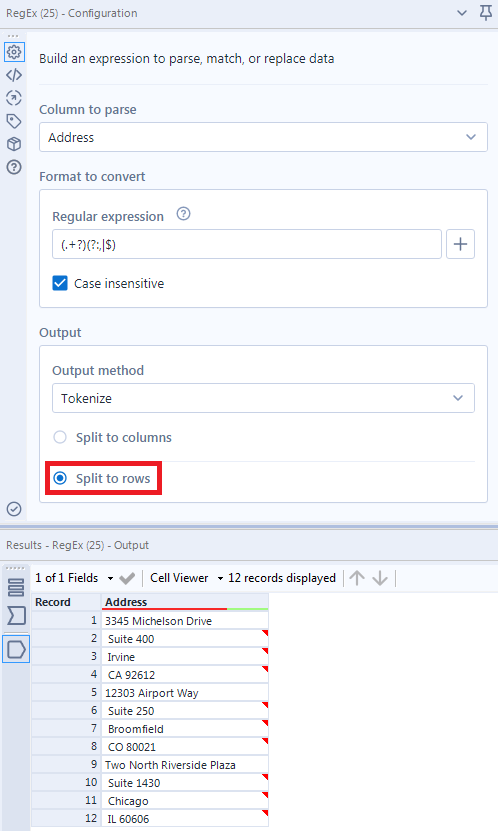
Since we have to match everything that we want, we need to use the expression (.+?)(?:,|$). Let's break this down:
- .+meansany one character.matched one or more times +
- ?is how we tell this match to be lazyrather thangreedy. This is a really useful distinctionthat may be a bit difficult to understand at first, but for the purposes of this crash course let's just focus on what the? means:match whatever is before zero times (not at all) or exactly once.
- The plus sign+is actually the opposite: it's agreedysymbol, so the previousone character .will try to matchone or more times. So what does it mean when we tell something greedy to be lazy? Well, it actually modifies just how greedy it can be by forcing it to look at the next match. So what.+?really means is:
'match one character one or more times until you can match whatever comes next'. - What comes next is anunmarked group(?:,|$)that essentially functions as a STOP sign for the previous (.+?). Since it's not in the marked group, it won't be present in the result. It's just in anunmarked group so that we can tell it to look foreithera comma ,orthe end-of-line $at the end of the text blurb.
Phew - that's certainly a lot. Feel free to take this opportunity to stretch, go for a walk, or meditate.
Obviously, the Text to Columnstool can split on a comma way easier than the above, but the flexibility ofTokenize comes into the fore when we try to do something a tad more useful.For instance, we can use it to split that block of address information into the original three addresses.
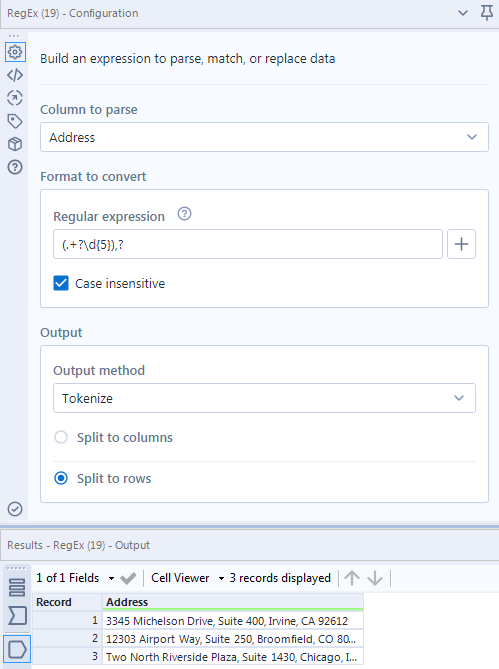
In this case, we are just using our last matching expression for the zip code \d{5}to mark out where each match ends. As above, we know that each line will either end with a comma or the end of line, and we could use the(?:,|$)here to split these successfully. In the example above, I chose to showcase the?ability to matchzero or onetime to replace this - so we can split on an 'optional comma' after the marked groupmatch.
For more onTokenize:
Extra Credit:The ,?won't work in the previous case, splitting by comma alone - (.+?),?instead of(.+?)(?:,|$). Why?
Comment with an explanation below for eternal glory and bragging rights.
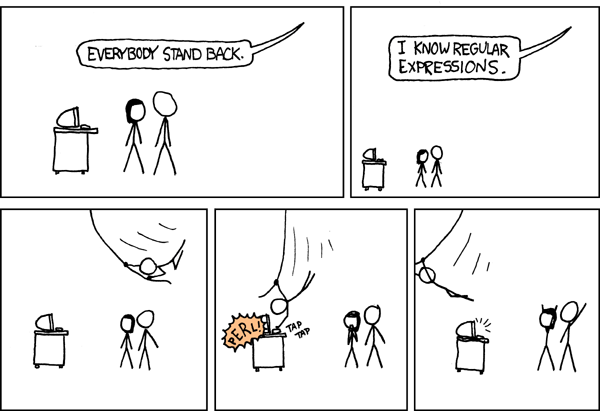
By now, you should have expert-level proficiency with the RegExTool! If you can think of a use case we left out, feel free to use the comments section below! Consider yourself a Tool Master already? Let us know at community@alteryx.com if you’d like your creative tool uses to be featured in the Tool Mastery Series.
Stay tuned with our latest posts everyTool Tuesdayby followingAlteryxon Twitter! If you want to master all the Designer tools, considersubscribingfor email notifications.
Additional Information
Click on the corresponding language link below to access this article in another language -


