 This article is part of the Tool Mastery Series, a compilation of Knowledge Base contributions to introduce diverse working examples for Designer Tools. Here we’ll delve into uses of the Message Tool on our way to mastering the Alteryx Designer:
The Message Tool within the Alteryx Designer is your own personal car alarm. This tool can provide you warnings or errors when your data doesn't meet a user-specified criteria or it can set up to tell you when data does not match.
The Message Tool can be set up to pick up records before, during and after the records have passed through the tool itself. This makes it useful for evaluating your dataset at different parts of your workflow.
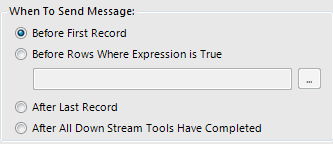
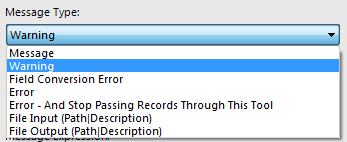
One of the useful features of the message tool is the ability to select the message type you want:
1: Message
2: Warning
3: Field Conversion Warning
4: Error
Among others:
If that wasn't enough - you can customize the message you get back!

Just take a look at this perfect use case which shows how to use the message tool and identify the row and fields which differ between datasets.
Another example is the threshold example. If you have an expected amount of records you think will pass through your workflow and want to be notified if this isn't the case. The Message Tool can be set up to send you one of the message types (workflow attached built in Alteryx 10.5).
By now, you should have expert-level proficiency with the Message Tool! If you can think of a use case we left out, feel free to use the comments section below! Consider yourself a Tool Master already? Let us know at community@alteryx.com if you’d like your creative tool uses to be featured in the Tool Mastery Series.
Stay tuned with our latest posts every Tool Tuesday by following Alteryx on Twitter! If you want to master all the Designer tools, consider subscribing for email notifications.


