When I try saving a workflow to my Gallery I receive two errors: (1) resulting from a dynamic input tool and (2) resulting from an In-DB tool. These issues do not occur when I run them on the local machine, only when I try saving it and allow Alteryx to 'validate workflow then save'.
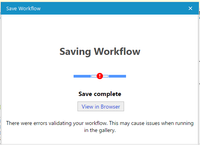
Additional detail about these issues:
Issue (1): This workflow downloads zip files containing CSV files from a site, extracts the CSVs from the zips, extracts the records from the CSVs, transforms the data, and ultimately pushes the data to my database. I'm using the Dynamic Input tool to handle the data extraction from the individual CSVs. This issue did not occur before I tried implementing new tools mentioned below in issue (2). The CSV template needed for the Dynamic Input tool is saved on my local machine and the flow runs without issue locally, however, when I try to save to the gallery I receive a "File Not Found" error.
Issue (2): I was previously using a normal input tool with a summarize tool to get the last RecordID from the table I'm pushing data to in order to generate the correct RecordID with each run. This configuration caused the flow to lag as it DB table grew, so I chose to implement a new solution with the In-DB tools. Initially, I had connectivity issues with the 'Connect In-DB' tool but was able to resolve those by creating a system connection (as opposed to a user connection) and selecting the correct driver. Since then, I have had no trouble running the flow locally, only when I attempt to save to the gallery and then I receive an "Error opening '[query]': No columns returned" error.

Can you all help me determine what might be causing these issues and how to resolve them?


