Dear Alteryx fellows,
I am currently helping a colleague to consolidate a large number of Excel files coming from different world regions into a single one (it was taking hours manually… and now only a few seconds with Alteryx with the proper workflow :-) ).
The single issue I have is that one of these files is generated with the wrong Excel format for some columns. This means, for ex. that, instead of displaying “2018” it shows “10-Jul-05” in Excel ("dd-mmm-yy" used instead of the "standard" format).
Hereunder, columns #1 and #2 are in the wrong format; column #3 is fine:
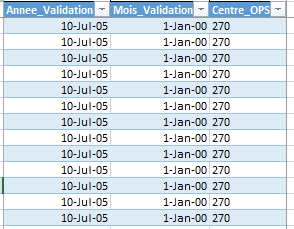
I have no possibility of changing the Excel format so I was wondering if there was a way to force the format in Alteryx?
For some columns (#2 and #3), Alteryx does interpret properly the numbers but column #1 is still wrong as it should display “2018”:
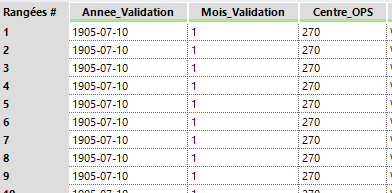
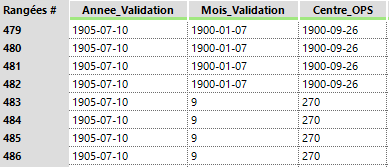
And, quite strangely, after more than 300 lines, the wrong format is displayed everywhere:
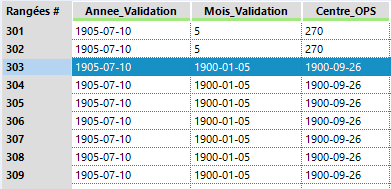
To go back to normal for columns #2 and #3 around lines:
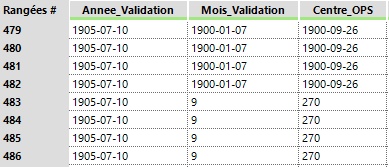
To back to normal for columns 2 and 3 around line 483:
I am attaching the Excel file for those who will be kind enough to have a look at it and the interpretation from Alteryx.
Thanks!
PLB


