 This article is part of the Tool Mastery Series, a compilation of Knowledge Base contributions to introduce diverse working examples for Designer Tools. Here we’ll delve into uses of the Tile Tool on our way to mastering the Alteryx Designer:
The Tile Tool is one of those Designer tools that appears to be nothing spectacular, but secretly simplifies a number of operations that would otherwise be labor intensive. The Tile Tool will never be as important as the Input Data Tool, as versatile as the Download Tool, make something as beautiful as the Render Tool, or be as totally rad as the Lift Chart (I mean just look at that icon, bro). Basically, if the Designer was the Beatles, the Tile Tool would be Ringo Starr. But hey, even though Ringo wasn’t the most important, handsome, or charismatic of the bunch, he still made impact in the world of music. And that’s just what the Tile Tool is about – impact. Check out the ways the Tile Tool can impact your Designer use and significantly reduce the difficulty of some operations:
- Create a “group by” record ID
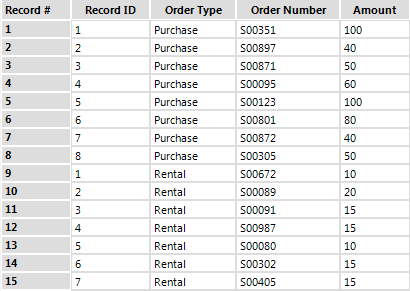
Simply use the Tile Method “Unique Value” and select the field(s) you would like to have the record IDs “grouped” to. This will reset the record ID (renamed from the “Tile_SequenceNum” field) counter for each unique value in your specified Unique Fields:
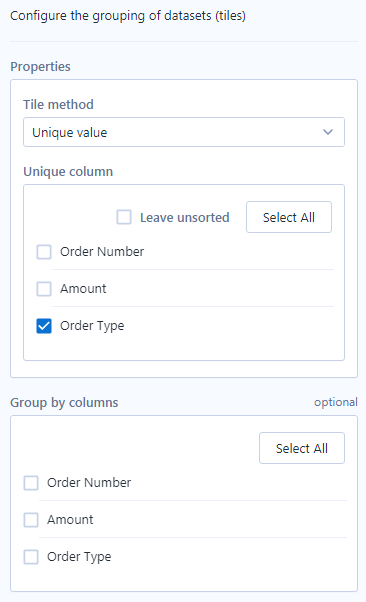
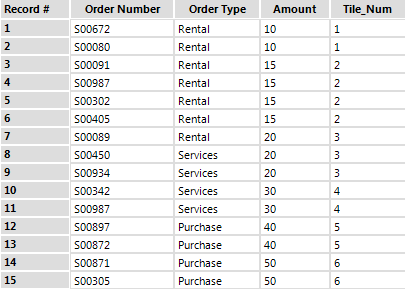
Just like before, use the Tile Method “Unique Value” and select the field(s) to determine uniqueness, the “Tile_Num” field will assign a new number (it can function as an ID) to each unique value that occurs:
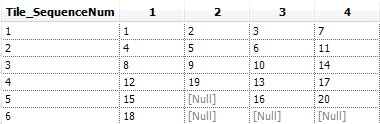
You can use the same approach (Tile Method “Unique Value”), specifying your cross-tab “New Column Headers” field as your Unique Field, to properly reshape datasets that might have missing values prior to a cross-tab. This is done by using the “Tile_SequenceNum” to group the data values in the cross-tab, requiring that each record of each field is listed individually, rather than with an aggregation method:

Equal parts? Try Tile Method “Equal Records” and specifying how many splits you want in your data by using “Number of Tiles”:
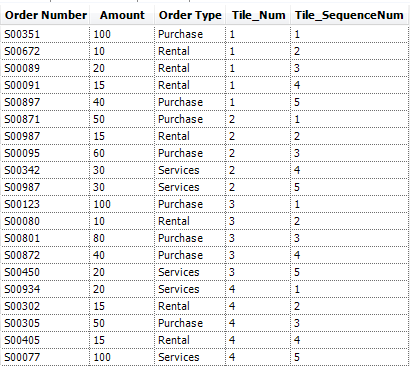
Equal sum? You guessed it – Tile Method “Equal Sum”:
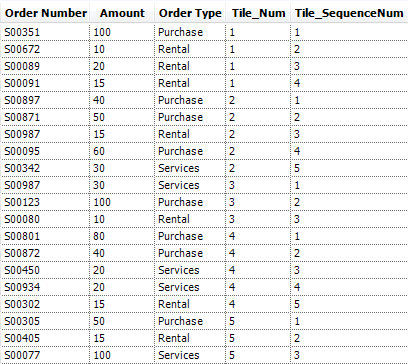
- Binning numeric values in your data set
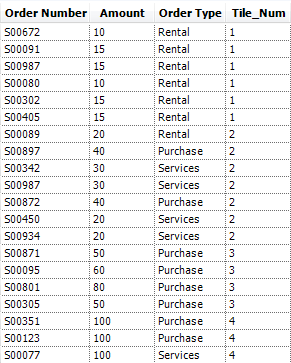
Want to determine bins or your own and determine where each record falls? Use Tile Method “Manual” and enter Tile Cutoffs to determine where your tiles begin/end:

All the examples above are included in the attached workflow, Tile.yxmd. Want to try your own rebinning of tile assignments? Try adapting the attached workflow, Rebinning Tiles for the Tile Tool.yxmd.
By now, you should have expert-level proficiency with the Tile Tool! If you can think of a use case we left out, feel free to use the comments section below! Consider yourself a Tool Master already? Let us know at community@alteryx.com if you’d like your creative tool uses to be featured in the Tool Mastery Series.
Stay tuned with our latest posts every Tool Tuesdayby following Alteryxon Twitter! If you want to master all the Designer tools, consider subscribingfor email notifications.


