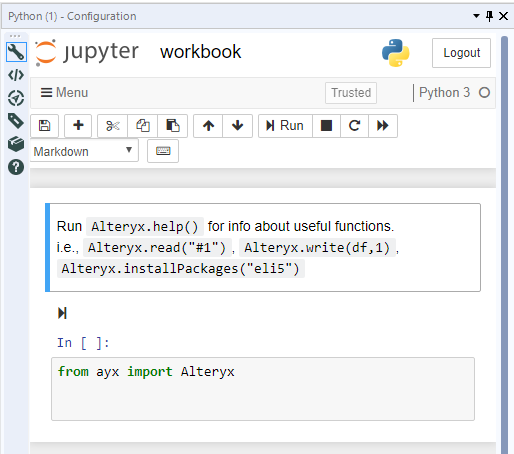
Has anybody else lost their Python code? It has happened to me twice. I go to run my workflow and see that my few hundred lines of code have been deleted and replaced with the standard default:
Hi @Chrispy,
It is fixed as part of 2018.4 so I would say a few weeks.
Kind regards,
Paul Noirel
Sr Customer Support Engineer, Alteryx
Hi @patrick_digan,
As Python tool is based on Jupyter, you need to save your notebook content regularly.
Did you see the message box "Is it OK to leave/reload this page?" when you clicked out of the tool ?
Thanks @PaulN. I can't actually identify when my code becomes lost. My code works fine when I'm working exclusively in the python tool. Then I'll use the output from the tool and build out other parts of my workflow. I've been saving my alteryx file the whole time along the way. Then I come in the next day and tinker around with the tools. Then I open my python tool, and it's lost my code. So I'm not sure when in there it would have been lost (ie when I left the python tool, when I saved the workflow, when I opened the workflow, when I opened the python tool).
When you say "save your notebook regularly", what is the best method? Is it enough to just hit Control + S which saves my alteryx workflow? Or do I need to use the save and checkpoint functionality of the jupyter notebook?
For what it's worth, I have been having this exact same issue. I will run Alteryx Designer as administrator, and save both the workflow and the Jupyter notebook (save and checkpoint) as I go. Yesterday, I ran the workflow, saved everything, and closed it out without receiving any popup windows. Today, I opened the workflow, and both Python tools in the workflow were reset to default. This loss has happened a few times now.
I experienced same issue yesterday, after saving workflow and notebook before closing. These flaw should be documented as a known issue because i would have lost a week's worth of work had it not been for a prior version of the workflow was saved elsewhere.
I have also experienced this issue.. did anyone get a definitive answer?
I was able to see my notebook code each day for about a week, but several weeks later I opened my workflow and my code is gone. I installed Anaconda since I last saw my code in the Alteryx Jupyter notebook, and wondered if the Anaconda install wiped out the Alteryx Jupyter notebooks, but don't think that is likely.
Adding my two cents here, I have been experiencing this issue as well... it is very frustrating. I have experienced what you attached where the code is reset, but more recently I have been more often having the problem where the tool gives its "click the workflow to initiate the tool" message, but I can never start the tool after clicking, even after waiting some time after clicking back on the python tool, and so the code is inaccessible.
A defect has been created for the issue and submitted to the Alteryx Team.
If code is still in the workflow then you should be able to access it through the XML view of the workflow (not from Python tool itself).
IT will be stored between <Notebook> and </Notebook>.
<Notebook>
</Notebook>
Just ran into this issue with the Python tool. Yesterday, I tested both of the workflows that use it (one directly, and one through a macro), and when I view the tool configuration in both cases, it is either empty, or I get a HTTP 404 message. I am using Designer 2019.1.6.58192 running non-elevated. Luckily, I pushed my workflows to a repository last night! I have not changed the code in my Python tool instances in several weeks (the macro code is an exact copy of the direct use of the tool), and this happened for the first time today.
I just spent about 45 minutes with an Alteryx Support engineer on this issue. I was able to show him the problem using Version 2019.1.6. Two steps that seem to help and may help others are
1. Resetting User Settings to their default values, ie. unchecking the box that allows you to Override System Settings on the Defaults tab. My System Settings have always been at their default values.
2. Running in Elevated mode, at least temporarily.
I was unable to recreate the problem after performing these two steps, even after returning to non-Elevated mode. The problem seems to show cause the following messages in the Jupyter Server log at C:\Users\[my userid]\AppData\Local\Temp:
[W 15:06:15.718 NotebookApp] 500 PUT /api/contents/9b281e01bf9f3e03c1a1d567a2f6cb0e/66/workbook.ipynb?token=ayx (127.0.0.1): Unexpected error while saving file: 9b281e01bf9f3e03c1a1d567a2f6cb0e/66/workbook.ipynb [Errno 2] No such file or directory: 'C:\\Users\\r626481\\AppData\\Local\\Temp\\9b281e01bf9f3e03c1a1d567a2f6cb0e\\66\\workbook.ipynb'[W 15:06:15.719 NotebookApp] Unexpected error while saving file: 9b281e01bf9f3e03c1a1d567a2f6cb0e/66/workbook.ipynb [Errno 2] No such file or directory: 'C:\\Users\\r626481\\AppData\\Local\\Temp\\9b281e01bf9f3e03c1a1d567a2f6cb0e\\66\\workbook.ipynb'
Iver
Following - Our team has reported several of these incidents in the past few months.
Still having this issue In August 2020, will Alteryx fix it? it's been annoying keep code backup and paste them back time after time.
I ran into this issue today. I had selected 'Disable Auto Configure' option in User Settings/Advanced. When I un-clicked this just now, the code was restored. Not sure if this is a solution broadly but it is working for my workflows. Hope this helps.
Even i faced the issue.
After some analysis, guess, i found a probable workaround for the issue. And probably it might help someone.
The plausible explanation why it happens is because if the code has a PRINT statement, then the contents of Python Notebook changes on execution of the tool.Removing the Print Statements from the code should help solve the problem.
I hit this same issue (losing code and jupyter 404 errors) with 2021.2.1.35394 and czr1803's workaround of disabling AMP fixed it immediately. Extremely frustrating!
Lost mine as well, running 2020.2. Clicked run on the workflow...process ran successfully...clicking back on the python tool and it is a blank canvas...
Any update on a solution would be greatly appreciated. We just starting using the Python tool and will likely use it more. We have already had once instance where the code was "lost". We are looking to expand our usage of this tool, but right now I am extremely hesitant.
I've noticed mine being lost a few times too - be sure to hit the save icon within the Python too!Hard to remember to do (for me atleast), but it seems to have stopped me losing the code.Cheers,TheOC
3 years later and my python code still has a mind of its own. AMP is off and I don't have any print statements. Most of the time, it simply reverts back a few steps, but even that can cause major headaches.
Myself and a coworker just started working with Python tool in Alteryx, only for us both to have the same issue with the Code reverting to default (e.g. code cleared out) on the same day. Now, we're realizing that anytime we leave the Python Tool, restart Alteryx, or even occasionally when we simply run the Code, the Python is likely to be completely reset, losing all completed work.
It seems this has been an issue for nearly 4 years now. Very disappointing to see this as a continued issue. I would rather the Alteryx Dev Team simply revert to simple Python code and got this working so that Python can be used, than use of Jupyter Notebooks (which even if it does make debugging easier now, seems quite useless if your code is just randomly deleted).
Is there any work being done on this issue at the moment? Please let me know if there's any information I can provide to try to get this resolved.
Hi everyone,
Jumping onto this thread...
I am running Version: 2021.4.1.04899. I used the Python tool with no problem, one day, saved the workflow, and today I'm getting the 404 error. All my code is gone. Per the above suggestion, my "disable autoconfigure" has always been unchecked.
Per the above thread and link for "how to reset the python tool"... I see that "From version 2020.3 onwards, you will need to reinstall Alteryx Designer. "Does this solve the problem once and for all, or is this something that will re-occur?
Should we be using this tool?
Please advise,
Thanks!
Delores
My code deleted today. This is Version: 2022.1.1.25127.
I was religiously saving after each change to the code. I figured I was done with code changes, so switched the workbook to Production mode. Then, when changing it back to Interactive mode, my code was completely gone (fortunately, I knew all about the risk of lost code, so I had a backup).
Yeah I still have problems with my Python code disappearing. As far as I can tell, it just seems to be a bad handoff between alteryx and jupyter. I can't seem to replicate it easily with certain steps, it just happens randomly.
The only silver lining is that I did stumble on where jupyter is storing all of its data, and I've been able to recover my code when I did lose it. When I looked in my temp folder (%LocalAppData%\Temp\), I was able to sort by date modified and find my alteryx temp folder for the particular workflow i had open (Engine_11824_aa12bdeef07d482db8c565b8f9b86a35_ for example). I looked through each subfolder and opened the many .ipynb files in notepad. I was glad to see that in each case I've lost my code, I was able to find my good code in one of the .ipynb files. Once you've found your code, you can actually import it back into alteryx:
In looking at the large number of ipynb files and the date modified, I came to the conclusion that somewhere an id is lost between alteryx and jupyter and it just starts a new file.
The exact same thing happened to me on Version: 2021.4.2.35356. Everything was working perfectly yesterday. Today, I closed Alteryx, updated my windows, and now everything is gone. I got a 404 error first, then my code was replaced with an empty template.
Any solution? Is the Alteryx team planning to solve this?
this happened to me a few times.i find the best solution is to never leave your python tool in edit mode. make sure you save, and always leave the tool in production mode
Thank you! I got gun-shy from using the Py tool after this painful experience and switched to the R tool. Maybe it has been just luck but I have not had the same problem with R.
I'm new using Alteryx, my version is 2021.3 and I just lost all my python code because of this issue that seems coming from 2018 Version and still not solved.
My python notebook is always saved, but even after save it's not an insurance that I can get it back?!?
By the way your python "developer" whatever you may call it is really poor, I mean I don't have any words to make a real and full description without falling into vulgarity. You're not able to introduce a simple functionality to allow downloading the notebook, that would be a simple "workaround" at least to save the notebook until a definitive solution.
Having the same issue on v. 2020.4.5. Does anyone know the outlook for a fix?
@AngelaO @DanM The problem still has not been resolved. Please prioritize fixing this. It is crucial that the python code remains present. This is a very serious problem.
@jayj1000
Please open a ticket with our Support organization. They can open a proper channel with our Product team to look into this issue.
DanM
@DanM This issue was first addressed in 09-11-2018. That's over 4 years ago. This issue has been well documented. Creating a ticket with Alteryx support is tedious and time consuming. I appreciate the Alteryx team, but I feel like this issue has not received enough attention.
For anyone looking for a list of potential solutions:1) Uncheck the box that allows you to "Override System Settings" on the Defaults tab. Options > User Settings > Edit User Settings2) Run Alteryx in admin mode.3) Uncheck "Disable Auto Configure" in the Advanced tab.Options > User Settings > Edit User Settings4) Remove print statements.5) Disable "AMP".6) Hit the save icon within the Python tool.
@jayj1000 we have reached out to your account team to see if they can help you.
This still happens to me continuously, no matter how many times I save the notebook or save the workflow. If I save the notebook, click the output, then go back to the notebook it will be completely blank. I'm not sure how anyone can develop in Alteryx with all of the bugs.
I put a few tutorials even during the tutorials you can see the notebook vanishing. I guess nobody wants to fix the bug
none of that is a 100% fix. The best fix is to save the code outside and load the notebook/script
it happens with or without those warnings
I'm also experiencing this sporadically, sometimes it's just the last 1-2 lines written, sometimes the entire code section of the python tool is blank when opening it again.
Edit: Scratch that, now every time I open the workflow and go to the 'Interactive' view instead of 'Production' it completely resets the code.. How is this still a bug considering there are threads about this all the way back into 2018?
I regualrly have this problem. Sometimes the code reappears but when this happens is seemingly random. This is after following best practice and saving before the notebook and workflow before closing. This seems to happen more often if the notebook has been inside a tool container that was turned off.
The easy fix is import your script in and this way it only ever be lost. Do your dev elsewhere which is annoying I know.
Hi,It is 2023 and am running version 2022.1.1.42619 admin designer with no admin privileges and am still having this issue. Has this been resolved or slated to be resolved in future fix packs/releases?
I'm dealing with this issue in 2022.3.1.573 - never had the code disappear completely, but sometimes will just randomly revert back to a prior save - maybe the last save, or maybe several saves ago...and sometimes I notice immediately, and sometimes I don't and end up needing to make the same edits I already did because I've basically branched my code without realizing. very annoying.
Checking up on this and glad there's discussion on the topic, but it appears others haven't enjoyed any update that has ensured a more stable working environment.
I've noticed this in my workflows for a while (2021.4). It's got to the point where my team routinely places a Comment tools above all Python tools to store a copy of the code. I initially thought the error had to do with copying Python tools (rather than pulling a brand new one down from the palette), yet I haven't noticed any consistency with loss of code - I usually save both the notebook and workflow file with each alteration. I definitely experience a 404 loss whenever a Python tool is on the non-receiving end of a Detour tool (so be sure to let the data flow through if you want to make revisions to a Python tool on the detour path).
Some of my workflows are pretty large (several thousand nodes) with many Python tools mixed in and I'm more recently finding certain Python tools will be entirely replaced with the contents of other Python tools. I think this behavior stops by pulling down a new tool in place of the offending tool, but this isn't a sustainable solution as long as I can't determine the consistency of the problem.
Trying to switch out currently-error Python tools for fresh ones hasn't solved the issue of code being entirely replaced with the contents of other Python tools, leading me to suspect that there's a limiting factor on the number of Python tools feasible in a given workflow.
I believe the issue is that the venv is one venv for your entire Alteryx environment. The standard (non-Alteryx) way this is managed is via containerized environment for each python app/tool. In your situation - I might create a hypervisor workflow which spot checks the python code for in the underlying workflows xml vs a code repo (or series of ..py files service as the code repo) - and updates as needed.