 This article is part of the Tool Mastery Series, a compilation of Knowledge Base contributions to introduce diverse working examples for Designer Tools. Here we’ll delve into uses of the Join Tool on our way to mastering the Alteryx Designer:
The Join Tool is the quintessential tool for data blending within Alteryx. As such, it is also one of the most widely used tools. The Join Tool allows you to join data together from two different sources in two different ways: by record position and by specific fields. Selecting by record position will attach the two datasets together where it will match up each record by the position it is in. Thus record 1 of the left dataset will be in the same row as record 1 on the right in the J output and so on. If one dataset from either side has more records than the other those records will not be joined and they will be placed in there corresponding right or left output (L or R). Joining by specific field will match records up based on a specific field or multiple fields. This article goes into how that option works in more depth and detail. I highly recommend it as a read, as it covers frequent behaviors of the tool that you might run into.
Below are some examples of how you might use a join:
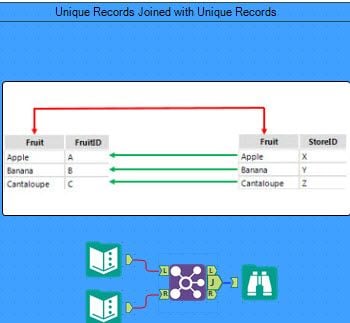
- Joining to bring a field not available in other data sources. As you can see in the two tables below, both have fields that are exclusive to those tables and we want to bring those fields together. We would do this by joining on "Fruit" as this is the common field/identifier between both datasets:
- Using Join as a filter. You can also use a join to filter out records if you have a secondary dataset or list you want to filter by. Seen below, since Customer ID 3 and 4 is not contained in Table 2, records containing 3 and 4 in Customer ID will get dropped from the center join:


Table 1 Table 2
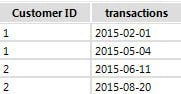
Joined result of Table 1 and Table 2
If you're noticing your join output has fewer records than anticipated, be sure to check out this article!
By now, you should have expert-level proficiency with the Join Tool! If you can think of a use case we left out, feel free to use the comments section below! Consider yourself a Tool Master already? Let us know at community@alteryx.com if you’d like your creative tool uses to be featured in the Tool Mastery Series.
Stay tuned with our latest posts every Tool Tuesday by following Alteryx on Twitter! If you want to master all the Designer tools, consider subscribing for email notifications.
Additional Information
Click on the corresponding language link below to access this article in another language -
Portuguese
Spanish
French
German
Japanese


