 This article is part of the Tool Mastery Series, a compilation of Knowledge Base contributions to introduce diverse working examples for Designer Tools. Here we’ll delve into uses of the CommentTool on our way to mastering the Alteryx Designer:
Now everyone loves to talk about theirworkflow masterpieces, however, the notion of documenting themdoesn't always hold the same appeal. TheComment Toolwould be happy to help and can make documentingand structuring your workflow easy and straight forward.Whether you want to include images, text descriptions or categorize parts of your workflow, the Comment Tool can act as a great refresher when revisitingworkflows and make it far more intuitivefor work colleagues to follow along. This article provides a few examples on how.
- The CommentTool will allow you tojot down notes, explain processes and share external references such as website links, internal Sharepointsetc.
- Within Excel color coding particular functions such as calculations, V-Lookups and Pivot Tables is common. Within the Comment Tool you have the ability of adding color tothe comment box, as well as adding annotations so it clear to seewhat processes are being performed as you move along your workflow.

- When adding a comment box it willas default appear in front of the tool icons however, you can use the functionality of 'send to back' for the icons to appear in front of the icons themselves (right click on the comment box).
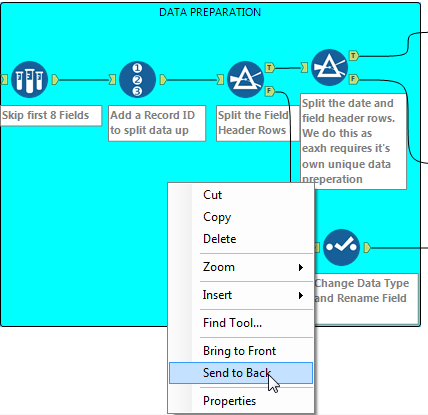
- Some additionalfunctionality within the comment box tool includes shaping the box, colorof the text, alignmentof the text, and specifying a background image.
- Adding an image to the comment box can be very useful when helping users visualizehow a tool can be configured.
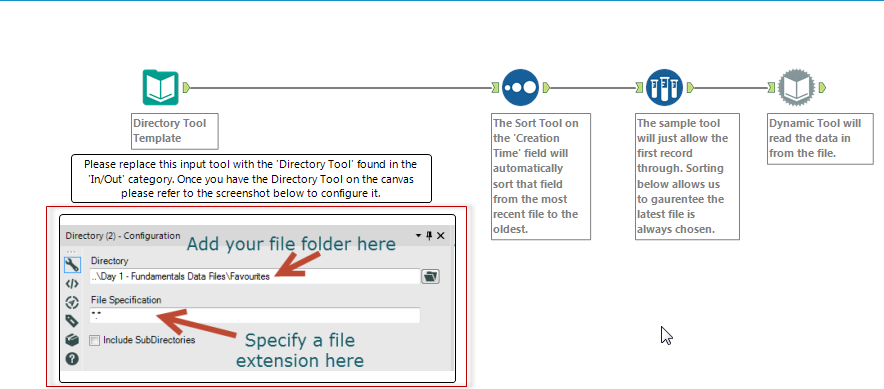
By now, you should have expert-level proficiency with the CommentTool! If you can think of a use case we left out, feel free to use the comments section below! Consider yourself a Tool Master already? Let us know at community@alteryx.comif you’d like your creative tool uses to be featured in the Tool Mastery Series.
Stay tuned with our latest posts every Tool Tuesdayby following Alteryxon Twitter! If you want to master all the Designer tools, consider subscribingfor email notifications.


