Hi all
I'm attempting to use the run command tool to run a .bat file which will rename (move) multiple files on my FTP server. I've got to where I am by using the methodology explained in this article, but obviously with a different final product, and I'm getting an error returned saying:
Run Command (16) The external program "./BatchFtp.bat" returned an error code: 2
I'm using Alteryx to download a list of FTP files that exist on my server, and once that's done (using the "Block Until Done" tool), move those files to the archive directory. Based on the same list of files that I download, I use Alteryx to create a file called ftpscript.txt, which compiles all of the code I need into a txt file, which I then use my as an argument in my .bat file.
BatchFtp.txt is:
ftp -s:ftpscript.txt
ftpscript.txt is:
open ftp.globalanalytics.16mb.com
user
password
rename "/Folder/file1.csv" "/Archive/file1.csv"
rename "/Folder/file2.csv" "/Archive/file2.csv"
rename "/Folder/file3.csv" "/Archive/file3.csv"
rename "/Folder/file4.csv" "/Archive/file4.csv"
disconnect
quit
Using my command prompt, I've tested the process by running the BatchFtp.bat file, and it successfully runs the script and moves the files on the FTP server, but for some reason, when I try to replicate this in Alteryx I get an error.
My "Run Command" tools is set up as follows, where I've just created a random temporary file as the output for "Write Source" just because there has to be something in there, and put the bat file in the command field.
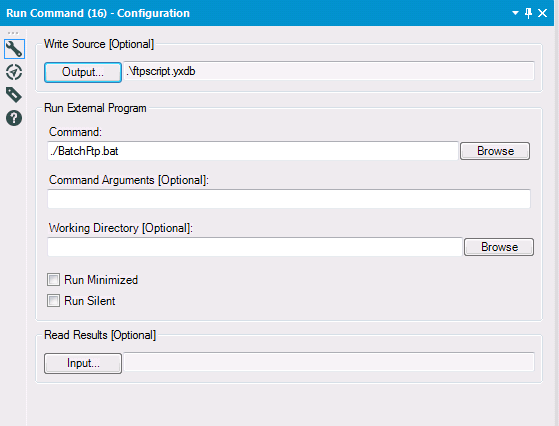
I can't come up with any logical reason why this isn't working. I'm hoping it's something really obvious regarding the tool itself which I seem to have missed.
Does anybody have any suggestions?
Thanks
Dan


