
This article is part of the Tool Mastery Series, a compilation of Knowledge Base contributions to introduce diverse working examples for Designer Tools. Here we’ll delve into uses of the Dynamic Input Tool on our way to mastering the Alteryx Designer:
For most tools that already have “dynamic” in the name, it would be redundant to call them one of the most dynamic tools in the Designer. That’s not the case for Dynamic Input. With basic configuration, the Dynamic Input Toolallows you to specify a template (this can be a file or database table) and input any number of tables that match that template format (shape/schema) by reading in a list of other sources or modifying SQL queries. This is especially useful for periodic data sets, but the use of the tool goes far beyond its basic configuration. To aid in your data blending, we’ve gone ahead and cataloged a handful of uses that make the Dynamic Input Tool so versatile:
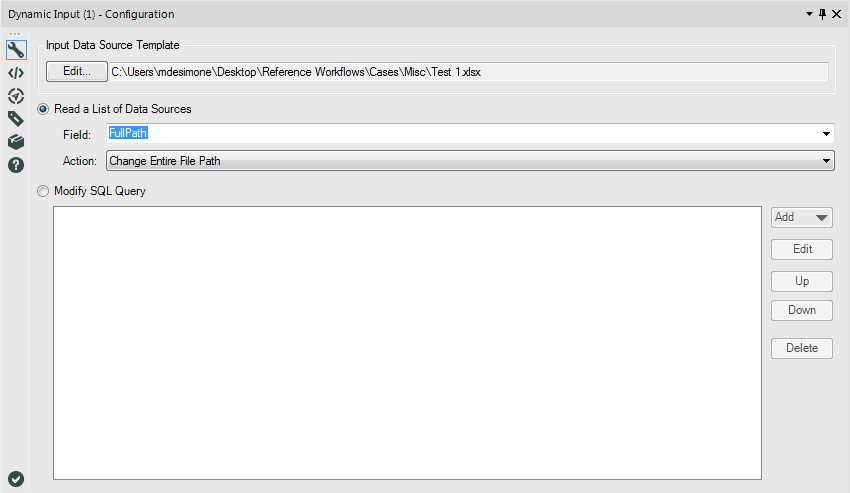
- Reading in a list of files by their file paths (as opposed to opening files in the same directory with a wildcard in the Input Data Tool). To do so, you need only to specify a field of file locations as your field in “Read a List of Data Sources” and “Change Entire File Path” as your action. The Directory Toolis often used to listfiles:

- Modifying SQL queries to replace strings, update where clauses, apply spatial filters, and edit stored procedures for your input (see attached).
- Accessing multiple worksheets from the same Excel workbook (see attached).
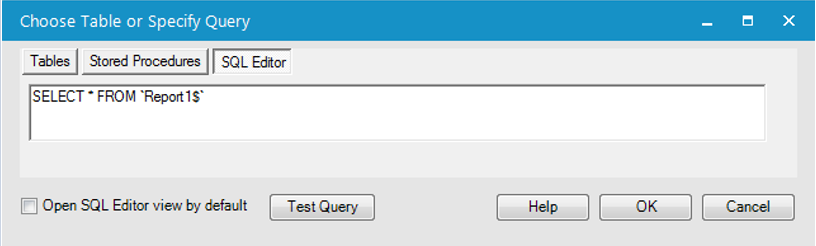
Since modifying SQL queries and accessing multiple worksheets inside the same Excel file are the least documented approaches on our Community, we’ve detailed approaches to the two in our attached v10.5 workflow “Dynamic Input.yxzp.” For the sake of transferability (we won’t have access to the same database connections), the SQL query used as an example is simply selecting all the records from the same Excel file as the first example – you can view the original query by looking in the template file’s SQL Editor view by selecting “Table or Query:”
Looking for more information on how to use the Dynamic Input Tool? Try our Community Live Training video Dynamic Inputs.If you’d like to learn more about inputting data in general, be sure to check out our Ultimate Input Data Flowchart as well!
By now, you should have expert-level proficiency with the Dynamic Input Tool! If you can think of a use case we left out, feel free to use the comments section below! Consider yourself a Tool Master already? Let us know at community@alteryx.com if you’d like your creative tool uses to be featured in the Tool Mastery Series.
Stay tuned with our latest posts every Tool Tuesday by following Alteryx on Twitter! If you want to master all the Designer tools, consider subscribing for email notifications.
Additional Information
Click on the corresponding language link below to access this article in another language -


