Hi,
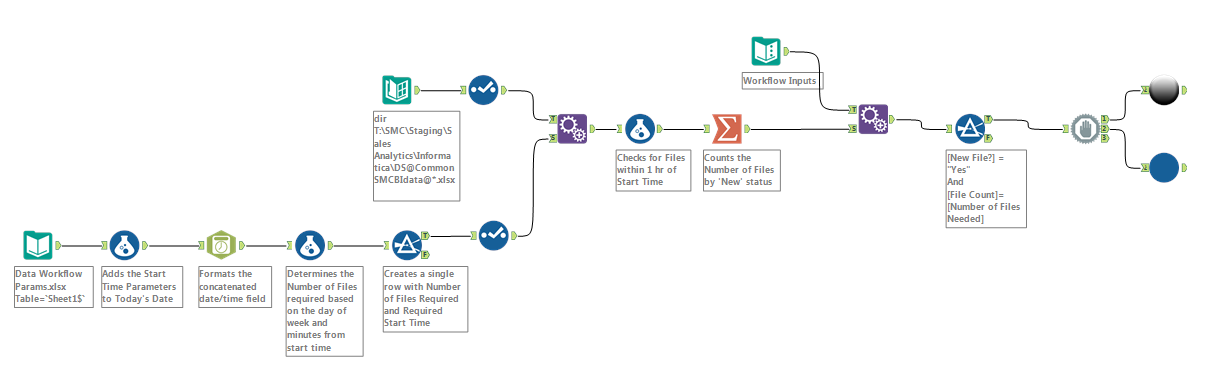
We have a workflow that we want to schedule 3 times a day but we only want it to execute when all of the required data files are present. I've set up a workflow that does everything I want except for keep checking until the condition is met.
Here's what I have so far:
- Looks at a file that contains the day, required start time and number of files expected. For that I just set up a simple Excel file.
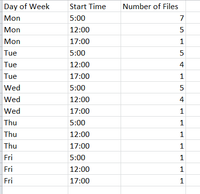
- Based on the current time, it determines which day routine to check (i.e. Mon, Tues, etc.) and which Start Time is relevant. It then takes the Start Time and Number of Files values as its thresholds.
- Reads in all of the available files in a directory that meet a specific format (e.g. DS@CommonSMCBIdata@*.xlsx) and checks their time stamps against the Start Time. If they're within an hour of the desired Start Time, then it flags them to include in the run.
- It counts all of the files that have been flagged to run. So long as that total is less than the Number of Files threshold, it just ends. Once that total reaches the Number of Files threshold, it kicks off the full workflow.
On that last item, if the total number of available files is less than the Number of Files threshold, what I'd like it to do is not end but rather wait a couple minutes and then check again and loop through that step until the Number of Files is reached. I assume that is possible but I can't figure out which combination of tools would be required to do that.